 Playwright로 시작하는 E2E 테스트 - React로 시작하는 TDD 번외편Getting Started with E2E Testing using Playwright - TDD with React Extra
📅
들어가기 전에 🔗
지난 15편의 여정을 통해 우리는
Vitest
와 RTL
을 이용한 단위/통합 테스트를 마스터했습니다.
하지만 여전히 찜찜한 구석이 있습니다."가짜 브라우저(jsdom) 말고, 진짜 크롬이나 사파리에서도 잘 돌아갈까?"
"로그인하고 페이지가 이동되는 과정이 진짜 매끄러울까?"
이런 고민을 해결해 주는 것이 바로
E2E(End-to-End) 테스트
입니다.
사용자가 키보드를 누르고 화면을 보는 실제 상황
을 완벽하게 재현합니다.
오늘은 그중에서도 가장 강력하고 빠른 도구인 Playwright
를 소개합니다.1단계: Playwright 설치 🔗
기존에 만들었던 React 프로젝트(Vite)에
Playwright
를 설치해 보겠습니다.
터미널을 열고 다음 명령어를 입력하세요.npm init playwright@latest설치 과정에서 몇 가지 질문이 나옵니다. 전부 기본값으로 진행하면 되기 때문에 엔터만 눌러도 무방합니다.
- Do you want to use TypeScript or JavaScript?->TypeScript
- Where to put your end-to-end tests?->tests(기본값)
- Add a GitHub Actions workflow?->True(자동화 테스트용)
- Install Playwright browsers?->true(테스트용 브라우저를 다운로드합니다)
설치가 끝나면 프로젝트 루트에
playwright.config.ts 파일과 tests 폴더가 생긴 것을 볼 수 있습니다.2단계: 서버 설정 (webServer) 🔗
E2E 테스트를 하려면 실제로 웹 서버가 켜져 있어야 브라우저가 접속할 수 있겠죠?
테스트를 실행할 때 자동으로 서버(
npm run dev)를 켜도록 설정해 줍시다.playwright.config.ts 파일을 열어 webServer 부분을 수정(주석 해제)합니다.import { defineConfig, devices } from '@playwright/test';
export default defineConfig({
testDir: './tests',
fullyParallel: true,
// ... (중간 생략)
// [설정] 테스트 시작 전 로컬 서버를 자동으로 실행합니다.
webServer: {
command: 'npm run dev',
url: 'http://localhost:5173',
reuseExistingServer: !process.env.CI,
},
});3단계: 첫 번째 E2E 테스트 작성 🔗
이제
tests 폴더 안에 example.spec.ts 파일을 만들고(또는 기존 파일을 수정하고) 테스트를 작성합니다.
우리가 만든 Counter
앱이 잘 동작하는지 확인해 보겠습니다.import { test, expect } from '@playwright/test';
test('메인 페이지 접속 후 카운터 동작 확인', async ({ page }) => {
// 1. 페이지 접속 (localhost:5173)
await page.goto('http://localhost:5173');
// 2. 초기 상태 확인 ("Vite + React" 글자가 보이는가?)
await expect(page.getByText('Vite + React')).toBeVisible();
// 3. 버튼 클릭 ("count is 0" 버튼 찾아서 클릭)
// Vite 초기 템플릿 기준 버튼 텍스트입니다. 우리가 만든 Counter라면 '+' 버튼을 찾으면 됩니다.
const button = page.getByRole('button', { name: /count is/i });
await expect(button).toBeVisible();
await button.click();
// 4. 결과 검증 (숫자가 1로 바뀌었는가?)
await expect(button).toHaveText('count is 1');
});문법이
RTL
과 비슷하면서도 조금 다르죠?
가장 큰 차이점은 모든 동작이 진짜 브라우저와 통신해야 하므로 await
가 필수라는 점입니다.4단계: 테스트 실행 (UI 모드) 🔗
Playwright
의 가장 멋진 기능인 UI 모드
를 실행해 보겠습니다.
터미널에 다음 명령어를 입력하세요.npx playwright test --ui그러면 화려한 GUI 창이 뜹니다.
여기서 재생 버튼(▶)을 누르면, 실제 브라우저가 뜨고 마우스가 스스로 움직이며 클릭하는 모습을 볼 수 있습니다.
타임라인(Timeline) 기능을 통해 각 단계별 화면 스냅샷도 확인할 수 있어 디버깅에 최고입니다.
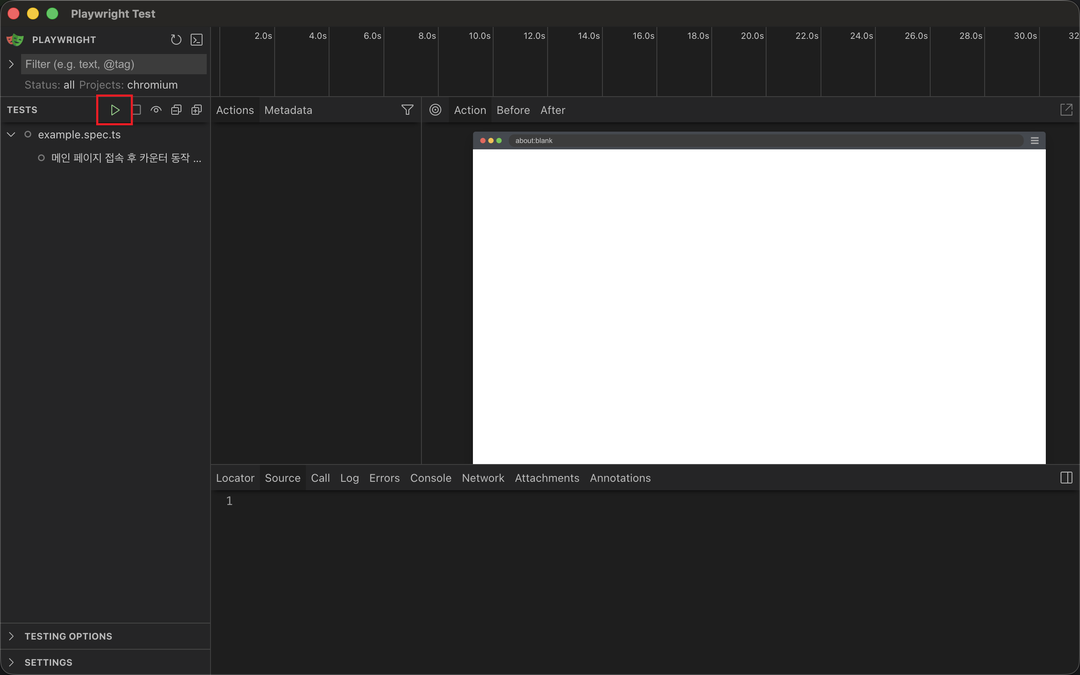
기본 Playwright UI 모드 실행 화면

테스트 성공
5단계: 코드 생성기 (Codegen) - 마법의 도구 🔗
"테스트 코드 짜기가 너무 어려워요!"
이런 분들을 위해
Codegen
기능이 있습니다.
브라우저를 켜고 내가 클릭하는 대로 코드를 자동으로 만들어줍니다.npx playwright codegen http://localhost:5173이 명령어를 치면 두 개의 창이 뜹니다.
- 브라우저 창:여기서 평소처럼 클릭하고 입력하세요.
- 코드 창:여러분의 행동이 실시간으로Playwright코드로 변환됩니다.
여기서 만들어진 코드를 복사해서 테스트 파일에 붙여넣기만 하면 테스트 작성 끝입니다!
결론 🔗
소스 코드는 GitHub - Promleeblog/react-tdd-setup↗ 에서 확인할 수 있습니다.
git clone https://github.com/PROMLEE/my-tdd-app.git
cd my-tdd-app
git checkout extra-playwright
오늘은 번외편으로
Playwright
를 이용한 E2E 테스트를 맛보았습니다.- 실제 환경 검증가짜가 아닌 진짜 브라우저에서 동작을 검증하여 신뢰도를 극대화했습니다.
- 강력한 도구UI 모드와 Codegen 기능을 사용하면 테스트 작성 비용을 획기적으로 줄일 수 있습니다.
- 통합 vs E2EVitest/RTL로 빠른 피드백을 받고(통합),Playwright로 핵심 시나리오를 최종 점검(E2E)하는 것이 이상적인 전략입니다.
새로운 기술이 나올 때마다 테스트 방법도 계속 발전할 것입니다.
하지만
사용자 관점에서 생각하고, 코드로 검증한다
는 본질은 변하지 않습니다.
지금까지 함께해 주셔서 감사합니다.참고 🔗
- Playwright Getting Started↗ Playwright 공식 문서의 시작 가이드입니다.
- VS Code Extension↗ VS Code에서 Playwright를 더 편하게 쓸 수 있게 해주는 확장 프로그램입니다.