On a single laptop, several browser tabs, Slack, music streaming, and a development server all use the network at the same time.
Yet there is only one network interface, and incoming packets carry only your IP address as the destination.
How does the operating system know
which process should receive the arriving data
?
In the previous post, we saw that the transport layer provides logical communication between processes.
This post looks at its core functions,
multiplexing
and
demultiplexing
, and compares how UDP and TCP find the right socket.
Multiplexing gathers data from multiple sockets, adds headers, and sends it into the network; demultiplexing hands arriving segments to the correct socket.
Multiplexing
The sending host adds headers containing source and destination information to data from multiple sockets, creates segments, and passes them to the network layer.
Demultiplexing
The receiving host examines segment headers and delivers the data to the correct socket.
Using the analogy from the previous post, collecting the siblings' letters and handing them to the post office is multiplexing, and distributing received letters by the name on them is demultiplexing.
Both TCP and UDP provide this function, and it is how the transport layer
turns host-to-host delivery into process-to-process delivery
Standard services such as HTTP 80, HTTPS 443, SSH 22, DNS 53
1024 ~ 49151
Registered ports
Applications such as PostgreSQL 5432 and MySQL 3306
49152 ~ 65535
Dynamic/ephemeral ports
Assigned automatically by the OS to client sockets
Server processes use fixed port numbers so clients can find them.
Clients usually do not specify a port; the operating system picks an unused
ephemeral port
.
The actual ephemeral port range can vary depending on operating system settings.
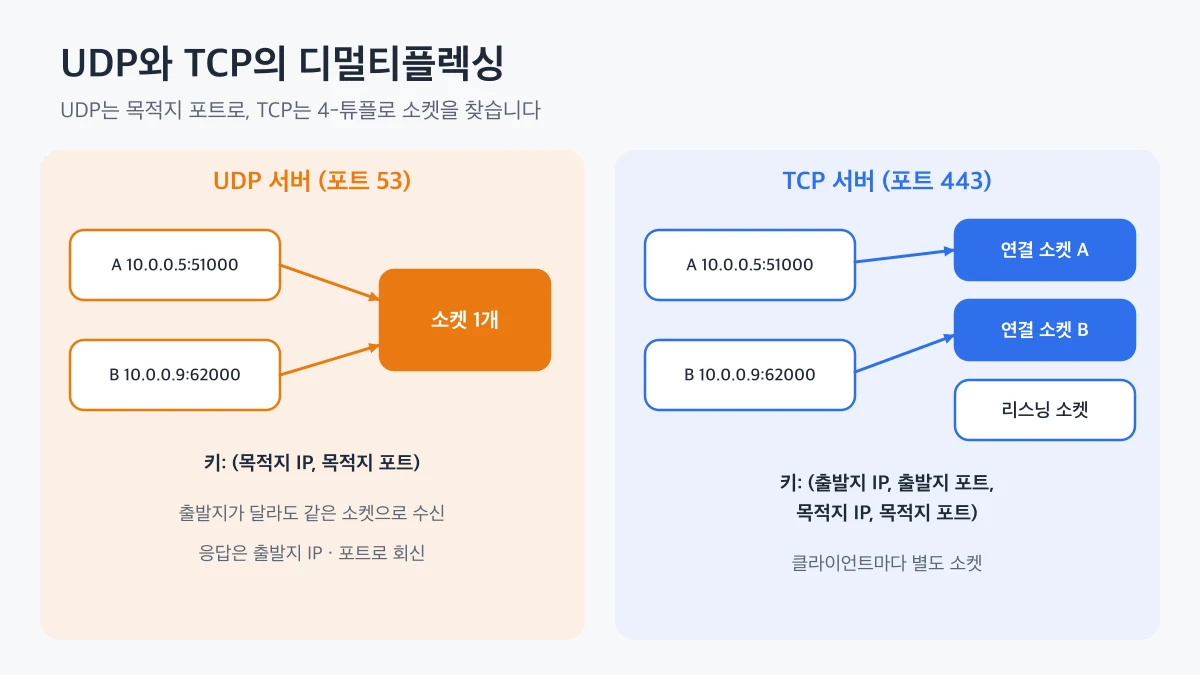
Comparison showing that a UDP server gathers segments with the same destination IP and port into one socket regardless of source, while a TCP server uses a separate socket per client based on a 4-tuple that includes the source IP and port
destination IP address and destination port number
, a 2-tuple.
The receiving host looks at a segment's destination port and delivers the data to the socket bound to that port.
So
segments with the same destination port go to the same socket, even from different sources
.
This is how a DNS server receives queries from countless clients on a single UDP socket.
How, then, does it send replies back?
The source IP and source port in the segment header act as the
return address
, so the server uses them as the destination for its response.
udp-demux.mjs
import dgram from "node:dgram";const server = dgram.createSocket("udp4");server.on("message", (msg, rinfo) => { console.log(`${msg} from ${rinfo.address}:${rinfo.port}`); server.send(`ack ${msg}`, rinfo.port, rinfo.address);});server.bind(6060, () => { for (const name of ["client-A", "client-B"]) { const client = dgram.createSocket("udp4"); client.on("message", (reply) => { console.log(`${name} got: ${reply}`); client.close(); }); client.send(name, 6060, "127.0.0.1"); } setTimeout(() => server.close(), 500);});
The two clients send data from different ephemeral ports, but a single server socket receives both.
The server replies using the source address and port in rinfo, so each client receives only the response meant for it.
source IP, source port, destination IP, and destination port
.
Even with the same destination port, segments with a different source IP or port are delivered to
different sockets
.
A TCP server works as follows.
The server process opens a
listening socket
on a port such as 443 and waits for connection requests.
When a client sends a connection setup segment, the server creates a
new connection socket
for that client's 4-tuple.
Subsequent segments from that client are delivered to the connection socket with the matching 4-tuple.
Even if two browser tabs connect to the same web server, the two connections have different source ports, so the server handles them with separate sockets.
This structure is easy to understand as a
hash table
from data structures.
The operating system looks up connection sockets using the 4-tuple as the key, so even with tens of thousands of connections it quickly determines the destination socket for each segment.
Let's look at TCP sockets connected to web servers or databases on macOS.
lsof -nP -iTCP:443 -sTCP:ESTABLISHED
The NAME column shows both ends of each connection in a format like 192.168.0.10:52814->203.0.113.5:443.
Left of the arrow is your IP and ephemeral port; right of it is the server IP and port 443.
If you see several lines for the same server, several separate TCP connections that differ only in source port are open.
On Linux, ss -tnp shows the same information, and on Windows, netstat -ano does.
👨💻
A high-traffic server that keeps sending short requests to another service can
run out of ephemeral ports
.
This is because, among the 4-tuple, only the source port can vary for connections to the same destination.
Enabling keep-alive and connection pooling in your HTTP client to reuse connections prevents this problem.
on the sending side, adding headers with port numbers to data from multiple sockets, and
demultiplexing
on the receiving side, delivering data to the right socket based on the header.
UDP finds a socket using only the destination IP and port, so one socket receives data from many clients, while TCP uses a 4-tuple and a separate socket per connection.
When dealing with port conflicts or connection count issues on a server, use lsof to distinguish listening sockets from connection sockets.
The next post takes a closer look at UDP's segment structure, its checksum, and the reasons to choose UDP.
 Multiplexing and Demultiplexing