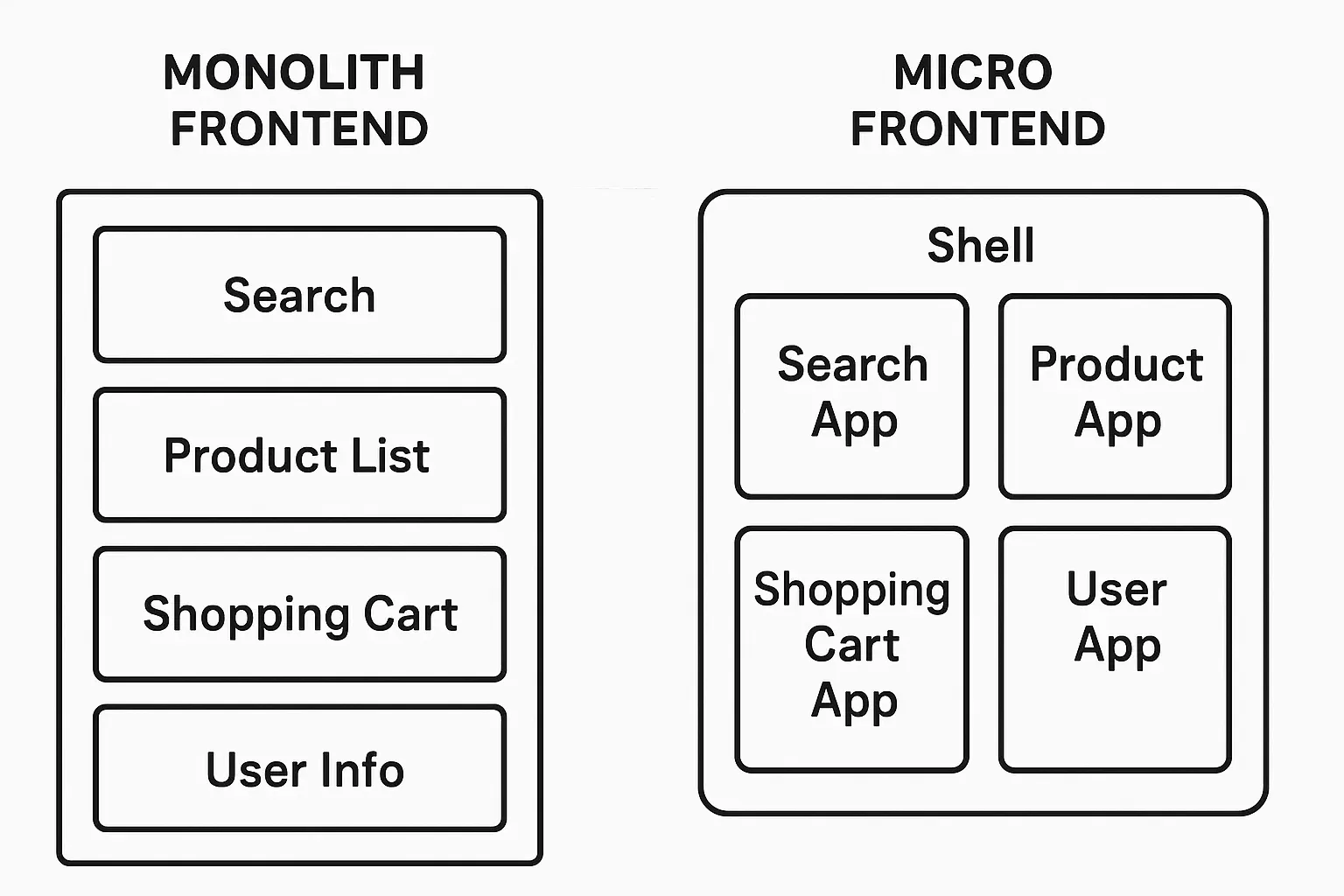
As an application gains features and more teams contribute to it, a
monolithic
frontend, developed and deployed as a single unit, can become harder to manage.
A growing codebase can make builds slower.
Even a small change may require testing and deploying the entire application.
Teams sharing one codebase face more merge conflicts and have a harder time choosing or upgrading their tools.
A bug or performance problem in one area can affect the whole application.
Micro frontends (MFE)
apply the idea of
microservices architecture
, which originated in backend development, to the frontend. We'll look at how micro frontends work, their advantages, how to implement them, and what to consider before adopting them.
Micro frontend architecture divides a large frontend into
small, independently deployable
applications, sometimes called micro apps. Users still see a single coherent website or app, but it consists of several independent parts working together.
Each micro app has its own codebase and can be developed, tested, built, and deployed separately. This can speed up development and releases.
Greater team autonomy
Each team owns a micro app that corresponds to a business feature or domain. Teams have more freedom to choose their tools and working methods, while still coordinating across the product.
Gradual upgrades and technology choices
Teams can introduce new technology or upgrade an existing stack in one micro app at a time. In principle, different micro apps can even use different frameworks, such as React, Vue, or Angular.
Manageable codebases
Splitting a large codebase into smaller ones makes each part easier to manage.
The oldest and simplest approach loads each micro app in a separate iframe. It is easy to implement, but communication between apps gets complicated, and URL handling and the user experience can feel awkward. These trade-offs make it less popular today.
Web Components
Use standard Web Components to encapsulate each micro app as a custom HTML element. This works across frameworks, though browser support and ecosystem maturity are considerations.
JavaScript integration
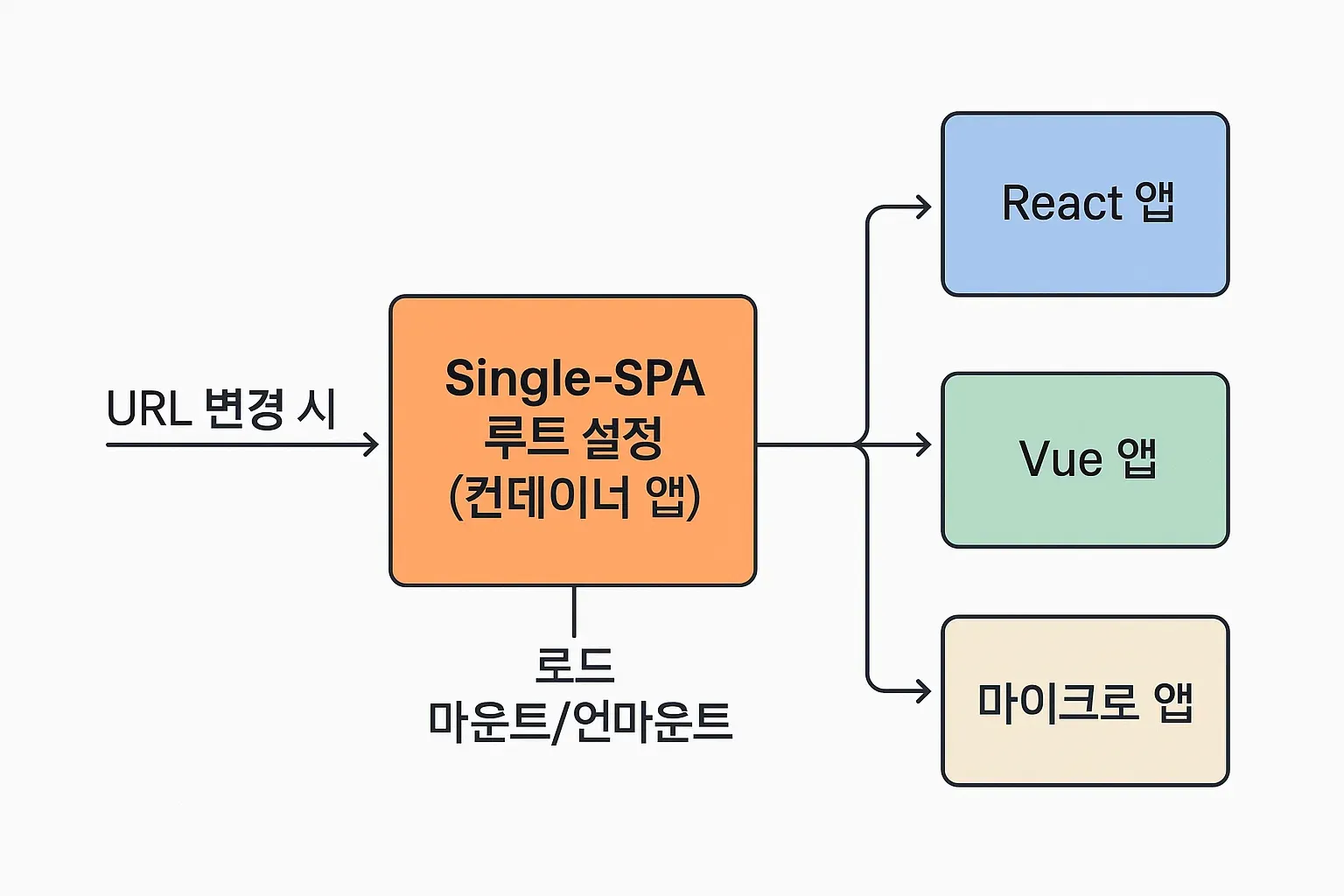
JavaScript dynamically loads and mounts each micro app in a specific DOM element. Tools such as single-spa and Webpack Module Federation use this approach.
Independent micro apps may still need the same libraries, such as React or Lodash, or the same components, such as buttons from a design system. Bundling those resources separately in every app makes the overall application larger.
Module Federation
, introduced in Webpack 5, helps solve this problem.
Module Federation lets separately built JavaScript applications share code dynamically at
runtime
.
Host
An application that imports and uses code from another application, called a remote. The container, or shell, typically acts as the host in a micro frontend.
Remote
An application that exposes its code to a host. Each micro app can act as a remote.
Shared dependencies
Libraries that hosts and remotes share. Module Federation considers library versions when managing these dependencies and can avoid duplicate loads. For example, if a host and remote are configured to share React v18, the browser can load that version once.
Exposed modules
Specific modules, such as components or functions, that a remote makes available to a host.
With this setup, containerApp imports and uses the UserProfile component exposed by profileApp as if it were local code. Shared libraries such as React can be loaded once.
Q: What is Webpack Module Federation, and what problem does it solve in micro frontends?
A: It lets independently built Webpack applications share code dynamically at runtime. Micro apps can share components and avoid loading common libraries more than once.
What to Consider Before Adopting Micro Frontends 🔗
Micro frontends offer several advantages, but adoption and operation also bring new responsibilities.
Initial setup
Configuring tools such as Module Federation or single-spa and building the integration takes upfront work.
Technology stack management
Teams can use different stacks, but too much variety can complicate development, builds, and deployments, and increase bundle size. Agree on a reasonable level of standardization or set guidelines.
Shared dependency versions
Plan how teams will manage the versions of shared libraries across micro apps. Module Federation helps, but teams still need to coordinate versions.
A consistent user experience
Teams working independently can easily diverge in design and behavior. Build and use a shared design system, ideally distributed as a library.
State and communication between apps
If micro apps need to share state or communicate, define clear interfaces and choose how they will communicate. Options include custom events, the window object, router state, or a global state library. This can be one of the hardest parts of MFE.
Team boundaries
Decide how to divide the apps and teams. Business domains, user journeys, and features are possible boundaries. Aim to keep dependencies between teams low.
Independent deployment pipelines
Each micro app needs a CI/CD pipeline so it can be built, tested, and deployed independently.
Operations and monitoring
Managing and monitoring multiple deployment units can make operations more complex.
Module Federation uses a dependency graph to manage shared modules and versions. single-spa can map URLs to micro apps through routing rules, much like a routing table.
Micro frontends can help manage the complexity of a large frontend.
They allow
independent development and deployment
, give teams
more autonomy
, and support
gradual changes
.
Teams commonly assemble micro apps with
runtime integration
, using iframes, Web Components, or JavaScript.
single-spa
handles routing and lifecycles, while
Webpack Module Federation
helps share code and dependencies.
The approach introduces challenges in
setup
,
user experience consistency
,
communication between apps
, and
operations
.
Whether micro frontends make sense depends on your application's size, team structure, and technical requirements. If you adopt them, plan the integration and roll it out gradually.
Next time, we'll cover frontend API communication and asynchronous work, from Axios and Fetch to AbortController and GraphQL clients.
 Micro Frontends for Large Applications — React Explained, Day 10