A support request comes in saying that users cannot reach a web service you deployed.
You need to decide whether the problem is the user's Wi‑Fi, the carrier's network, or the server.
If you think of the Internet only as "a giant cloud somewhere," you cannot decide where to start looking.
In this article, we look at the Internet from two perspectives: its
components
and its
services
.
We then explain what a
protocol
is and how it lets every device talk using the same rules.
Finally, we use the macOS Terminal to see where your own computer sits on the Internet.
This is the first article in the Network Intro series; later articles cover the edge, the core, delay, and the layered architecture in turn.
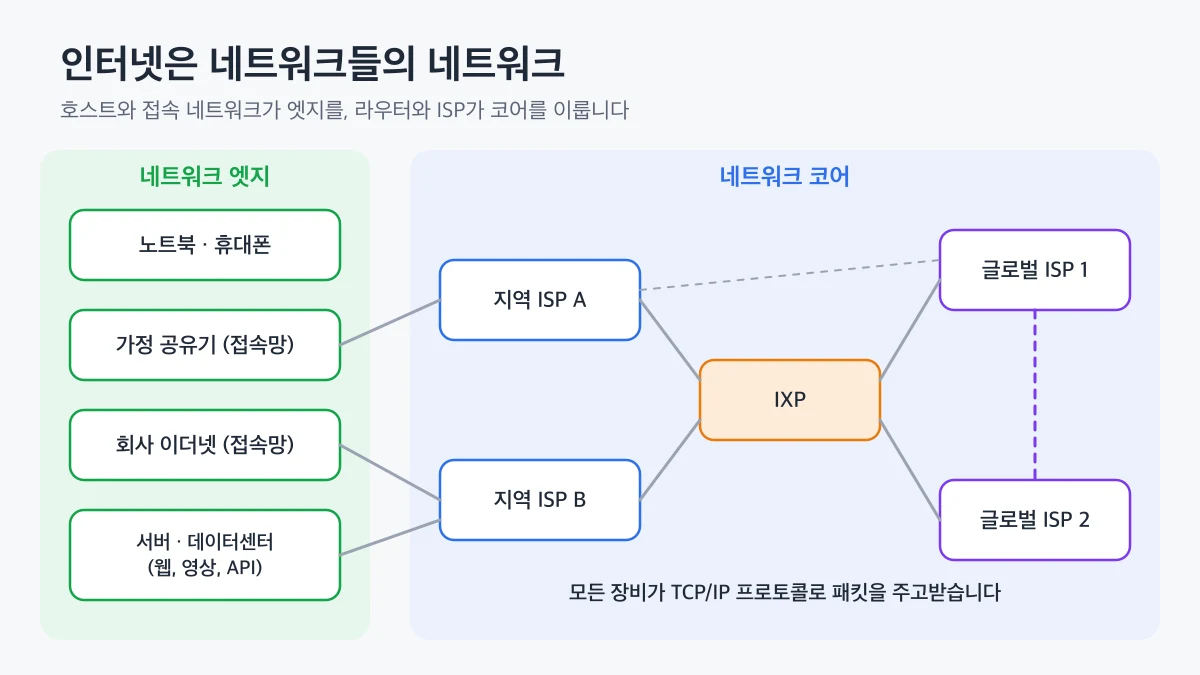
(Internet Service Provider).
Residential carriers, business leased-line providers, and mobile operators are all ISPs.
ISPs in turn connect to larger regional or global ISPs, and this hierarchical structure is what allows packets to reach servers on the other side of the planet.
A large network unit operated under a single routing policy, such as an ISP, is called an
Autonomous System
(AS), and each AS receives a unique ASN (Cloudflare · What is an autonomous system?↗).
A physical location where multiple ISPs and CDNs connect directly to one another is called an
IXP
(Internet Exchange Point) (Cloudflare · What is an Internet exchange point?↗).
With an IXP, traffic is exchanged nearby instead of detouring through distant upstream ISPs, which reduces both latency and cost.
👨💻
When analyzing an outage, splitting the path into
your device → home router → ISP → server network → server
Seen through the eyes of an application developer, the same Internet looks different.
From this perspective, the Internet is
an infrastructure that provides data delivery services to distributed applications
.
The web, messaging, video streaming, and online games are distributed applications in which programs running on different hosts exchange data.
Applications do not deal with routers or links directly.
When an application hands data to the
socket interface
provided by the operating system, the layers below deliver it to the destination.
The code below is an example of opening a TCP socket in Node.js and sending an HTTP request directly.
The code contains no router addresses or path information at all.
You only specify the destination host and port with net.connect; the Internet infrastructure decides which path the packets take.
Because of this design that separates applications from the delivery infrastructure
, you do not have to change network equipment when building a new service.
A protocol is a set of rules that defines the format and order of messages exchanged between communicating entities, and the actions taken when a message is received.
Even asking someone for the time follows rules.
You first say "Excuse me," ask your question once the other person responds, and say thank you after hearing the answer.
If the other person does not respond, you do not ask the question and find someone else instead.
Network protocols have the same structure.
When a browser requests a web page, it first sends a TCP connection request, and once the server sends an acceptance, it sends the HTTP request message.
If any of
the message format, the order of exchange, or the action after receipt
(Internet Protocol), which defines the packet delivery format, and
TCP
(Transmission Control Protocol), which provides reliable transport.
That is why the Internet's protocol suite is often called
TCP/IP
.
The base specification of IP is in RFC 791↗, and the current TCP standard is in RFC 9293↗.
The main organization that produces RFC (Request for Comments) documents is the
IETF
(Internet Engineering Task Force).
The IETF is an open standards organization that anyone can participate in, and it creates technical standards for how the Internet works (IETF · Introduction to the IETF↗).
Because they follow the same RFCs, an Apple laptop, a router from another vendor, and a Linux server can exchange packets without problems even though they come from different manufacturers.
👍
Even for the same topic, a newer RFC often replaces an older one.
For example, RFC 793, the original TCP specification, has been replaced by RFC 9293, so when checking an implementation or behavior, look at the
ipconfig getifaddr en0
Prints the IP address your host received from the access network. If you use a wired adapter, the interface name may differ from en0.
netstat -rn -f inet
Find the default entry in the routing table to learn the address of the home router your packets reach first, that is, the
default gateway
.
traceroute
Shows the routers on the way to the destination one hop at a time. -n skips name lookups, and -q 1 measures each hop only once.
The traceroute output looks roughly like this.
traceroute to www.promleeblog.com (76.76.21.21), 12 hops max, 40 byte packets
 1  192.168.0.1  2.104 ms
 2  10.32.0.1  6.871 ms
 3  *
 4  112.174.48.129  8.442 ms
 5  76.76.21.21  9.015 ms
The first hop is the home router, the next few hops are routers inside the carrier's ISP, and the last is the service's network.
A * means that router did not respond; many devices block these responses by security policy, so it
does not indicate a failure
.
The addresses, hop counts, and times vary depending on your network and the time of measurement.
On Windows, use the ipconfig, route print, and tracert commands.
On Linux, you can check the same information with the ip addr, ip route, and traceroute commands.
hosts, communication links, packet switches, and ISPs
are connected hierarchically.
From a developer's perspective, it is also a service infrastructure that delivers data to its destination once an application hands it to a socket.
And all of these devices can work together because they follow
standard protocols
published by the IETF as RFCs.
When you run into a connectivity problem, check the path with traceroute and determine whether the problem is at your edge, in the ISP core, or on the server side.
In the next article, we take a closer look at
the network edge and access networks
, the segment where a host first connects to the Internet.
 What Is the Internet - Components, Services, and Protocols