Imagine you download the archive at the top of the search results and run it without a second thought.
If that file is a fake that only borrows a popular tool's name, your computer gets attacked before you even start analyzing anything.
Reverse engineering tools exist to open untrusted files, so
both installing the tool and opening the target can become an entry point for an attack
.
REA is no exception.
As the official repository gathered about 470,000 stars as of November 2026, releases imitating the same name appeared.
This post covers two things.
How to tell fakes apart while downloading and installing the tool
How to separate the lab environment on the assumption that the target may be malicious
The incident in this post is based on reports and public material, and anything I could not verify myself is marked as such in the text.
Commands and options are as of November 23, 2026, so check rea --help and the official documentation again before you actually install.
According to a pbxscience article↗, a fake archive carrying the REA name was distributed.
The file was 82.6MB, was reportedly downloaded 172 times by the time it was reported, and the archive is said to have contained a trojan.
A trojan is malicious code disguised as a normal program so that the user runs it themselves.
👍
The details of the incident rely on a third-party article.
I did not verify file hashes or detection reports myself for this post.
What stands out in this incident is that the attack
required no special skill
.
All it takes is imitating a popular open source project's name and a plausible version number.
This is a typical form of
supply chain attack
, which targets the tools and packages developers use.
Do not run a file you got from search results or a shared link until you have compared it with the official distribution channel.
According to the same article, since this incident the official README tells users to get REA only from the following three places.
The mirror↗ on SourceForge and similar sites is not an official distribution channel.
Even if the name is identical, do not install it if the source is not on this list.
Even after confirming the official repository, check once more that the package your install command points to is the right one.
Publishing a package whose name differs by a single character and waiting for typos is called
typosquatting
.
Check in this order before installing.
Package name
Make sure it exactly matches the name in the official README.
The official name is rea-agents.
Metadata
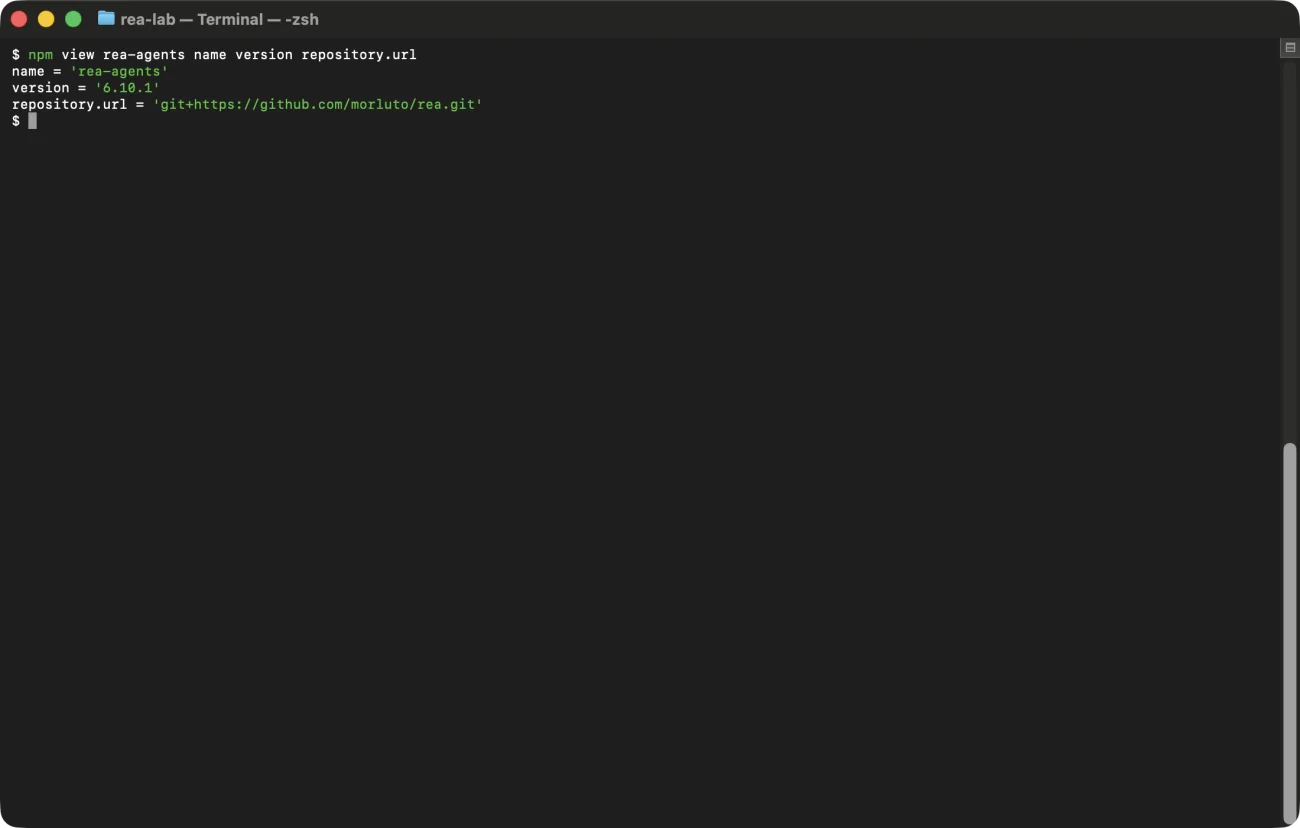
Use npm view rea-agents to check the latest version and repository URL.
Repository URL
Make sure the package's repository URL points to morluto/rea.
Here is the result I actually got in the Part 4 lab.
Terminal window running npm view rea-agents, printing name rea-agents, version 6.10.1, and repository.url git+https://github.com/morluto/rea.git
The name was rea-agents, the version 6.10.1, and the repository URL git+https://github.com/morluto/rea.git, matching the official repository.
If the output differs from the official repository, stop the installation and find out why first.
There is also something to check during installation.
When I ran npm install --global rea-agents in Part 4, npm left a warning that it had not run the install script of the dependency frida because it was not on the allow list.
An install script is code that runs the moment you fetch a package, so it is safer to allow one only when a feature you need truly requires it.
REA's DISCLAIMER↗ tells users to review the tasks they request and the plans and scripts the agent produces, and to
handle untrusted targets in an appropriate environment
.
In reverse engineering, the level of risk depends on how you work.
Task
Runs the target?
Risk
Static analysis (reading files only)
No
Relatively low
Dynamic capture (observing while running)
Yes, with user privileges
High
Debugger integration
Yes
High
According to REA's supported targets document↗, JS and .NET static analysis only reads files without running the app.
Runtime capture, on the other hand,
runs or interacts with the target with user privileges
.
So
even with the same tool, the lab environment you need depends on which features you turn on.
Another risk is the agent and the package runner themselves.
If the target folder contains configuration files, a malicious project can change how the tools behave.
REA's installation guide↗ notes that package runners can read project configuration, and recommends fetching REA from a trusted working directory outside the target project and passing absolute paths to analysis commands.
That is also why Parts 4 and 5 kept the lab folder separate at ~/rea-lab.
🖐️
Do not run a binary of unknown origin with dynamic capture or a debugger under your everyday account.
The DISCLAIMER also states that having permission to analyze does not give you permission to run or intercept.
The setup below is general advice, and this post did not verify the security guarantees of any particular isolation tool.
Virtual machines and snapshots
Take a snapshot before running the target and roll back when the lab is done.
On macOS you can use UTM or Parallels, and on Windows and Linux tools such as Hyper-V, VirtualBox, and KVM.
Network isolation
Open only the hosts the analysis VM needs and block all other outbound traffic.
Dedicated user account
Run things in an account that has no personal documents, browser logins, or SSH keys.
Limits of containers
Containers are lightweight but share the kernel with the host.
If malicious code exploits a kernel vulnerability the isolation can break, so a VM is recommended for risky targets.
Agent permission mode
Configure the agent to ask for approval before running commands, and turn on sandbox settings where available.
When you run the MCP server over HTTP, reduce its exposure.
According to REA's CLI guide↗, --host and --port for rea mcp --http follow the environment variables MCP_HOST and MCP_PORT first, and if neither is set they use 127.0.0.1 and a random port.
To bind to an address outside loopback (127.0.0.1), you must specify the client hosts allowed to connect with --allowed-hosts or MCP_ALLOWED_HOSTS.
The official examples also include a form that opens on all network interfaces, such as --host 0.0.0.0.
That lets other devices on the same network connect, so use it only when you really need it and narrow the allowed range with --allowed-hosts.
Check the available options with rea mcp --http --help.
In Parts 4 and 5 I installed REA and analyzed an Electron app and a native binary hands-on, and this post summarized the security issues that come up along the way.
Looking at it once more from a security perspective, it comes down to this.
Situation
Is it useful?
Checking whether your own app's release leaks source maps or secrets
Yes
Tracing function behavior in a small public binary
Yes, provided you verify it
Bypassing protections in a commercial app without permission
No (prohibited by the DISCLAIMER)
Installing a release of unknown origin
No
Fully reimplementing large commercial software
Not confirmed by any public case so far
Going forward, it is worth watching whether public cases involving large software appear, whether case law on AI reimplementation emerges, and whether the supported targets expand.
REA is not an all-purpose copier but closer to an analysis assistant that attaches evidence, and that evidence still has to be verified by a person.
And before you start that verification, putting the tool and the target in a safe place comes first.
 REA Security - Fake Releases and Untrusted Binaries