Superpowers and mattpocock/skills Compared as Agent Development Methodologies | PromleeBlog
When you ask Claude Code to "add social login buttons to the login screen," the agent often starts editing files right away.
It is then hard to tell later where the requirements drifted or whether there are any tests.
To reduce this, several skill repositories have appeared that set the order of work for the agent.
The two repositories that ranked first and second in the Part 2 ranking of this series are
Superpowers
and
mattpocock/skills
.
Both repositories aim to have the agent decide what to do before it starts work.
Their approaches differ.
Superpowers is a
methodology that enforces the entire development sequence
, from design approval through TDD to code review.
mattpocock/skills is a
toolkit of small skills
, such as question sessions, TDD, and ticket breakdown, that you pick and adapt as needed.
Let me first explain what a skill is.
As with the SKILL.md structure covered in Part 1, a skill is a bundle where instructions are written in a SKILL.md file inside a folder, and the agent loads it when it fits the task.
Both repositories layer their own workflows on top of this structure.
This post covers the README descriptions of both repositories and also the results of running the same task with both skill sets.
The first attempt stopped because Claude Code CLI authentication was not working. After confirming authentication, I reran it on November 28, 2026.
Each condition ran once, using Haiku as the model.
I still organized the installation methods and flows based on the READMEs, and I wrote the run results separately in the practice section later in this post.
👍
The practice figures below come from one run per condition. The sample is small, so read them as observations, not conclusions. The READMEs describe what the authors wrote, so you should check actual behavior in your own environment.
Superpowers: enforces the order from design approval through review 🔗
The Superpowers README describes this repository as a development methodology made of composable skills and initial instructions that make the agent use those skills without fail.
When the agent detects that it is about to build something, it does not start coding right away. Instead, the
brainstorming
skill draws out the intent through questions.
The README lists a seven-step flow.
brainstorming
Asks about intent, then plays back its understanding and takes corrections.
using-git-worktrees
Once the design is approved, creates an isolated workspace on a new branch and checks the test baseline.
writing-plans
Splits the work into 2 to 5 minute units, and puts a file path, code, and a verification method in each task.
subagent-driven-development
Starts a new subagent for each task and reviews after each task finishes. There is also executing-plans, which runs the plan inline.
test-driven-development
Confirms a failing test first, passes it with minimal code, then commits. Code written before the test is deleted.
requesting-code-review
Between tasks, compares against the plan and reports problems by severity.
finishing-a-development-branch
Checks tests, offers choices among merge, PR, keep, or discard, then cleans up the workspace.
The README calls this flow a
required workflow
, and explains that skills trigger automatically, so the user does not need to call a skill by name.
The README also says that small changes are agreed on in chat, and design documents are written only for project-scale work.
Still,
seven steps may be too much for a small fix.
This judgment comes from reading the README flow. The practice run below was one task that edited a single small function, so I did not measure how long the seven steps actually take.
The author explains that once a design is approved, the agent often works autonomously for hours without drifting from the plan.
This is the author's claim. The README has no measurement basis for it.
mattpocock/skills: reduce misalignment with questions and small skills 🔗
The mattpocock/skills README criticizes frameworks such as GSD, BMAD, and Spec-Kit for taking over the process, which takes control away from the developer and makes bugs hard to trace.
As the alternative, this repository offers skills that are small, easy to edit, and composable.
The README links four common agent problems to one skill each.
The agent does not build what you wanted
Fills in empty branches of the plan first with the question sessions /grill-me or /grill-with-docs. grill-with-docs also updates GLOSSARY.md and ADRs.
The conversation gets verbose
Builds a shared project glossary so that people and the agent use the same words. The README says that doing this also keeps variable, function, and file names consistent.
The code does not work
Runs a red-green-refactor loop with /tdd, and for tricky bugs, /diagnosing-bugs follows the order: reproduction loop, minimization, hypothesis, instrumentation, fix, and regression test.
The codebase gets tangled
/improve-codebase-architecture finds candidates for turning code into deep modules and shows them in an HTML report. The author suggests running it every few days.
The way skills are divided also differs from Superpowers.
The README separates
skills the user types directly
from
skills the agent uses on its own when they fit the task
.
/grill-me and /triage are called by the user, while /tdd and /diagnosing-bugs are used by the agent when needed.
The README explains that user-invoked skills coordinate the flow, and model-invoked skills hold reusable discipline.
Superpowers assumes automatic triggering, while mattpocock/skills has the user choose which stage to call.
Installation and update methods differ between the two repositories 🔗
Superpowers has a different install command for each coding agent.
The README's install section covers 16 harnesses, including Claude Code, and each one must be installed separately.
In Claude Code, you can use the official marketplace command, or first register the Superpowers marketplace.
mattpocock/skills installs with a single plugin command in Claude Code.
claude plugin install mattpocock-skills@claude-plugins-official
After installation, run /setup-matt-pocock-skills once inside the agent for each repository.
According to the README, this command asks for the issue tracker (GitHub, GitLab, local files, and so on), triage labels, and where documents are stored.
In other agents, use the skills.sh path.
npx skills@latest add mattpocock/skills -a <agent>
The update method also differs.
If installed as a plugin, mattpocock/skills updates itself by default.
Files copied with npx skills must be updated by the user, and the README says to run npx skills@latest update.
Superpowers' updates depend on the coding agent, but the README says they are generally automatic.
Do not install both methods on the same agent at once.
The README warns to choose only one per agent. If you install both, every skill gets loaded twice.
👨💻
The README's Muse install item says to send a request to create a React to-do list in a new session, to check that brainstorming runs before any code is written. Right after installation, it is better to check first whether skills trigger like this.
With Hermes Agent, if a long session is compacted past the first turn, the bootstrap instructions can disappear. The README advises opening a new session if skills do not trigger.
Hooks and telemetry defaults should be checked before installing 🔗
Installing a skill means letting the agent run instructions and scripts written by someone else on your computer.
The Superpowers README explains that, in the Muse install item, the using-superpowers instructions are injected through a SessionStart hook, as in Claude Code and others.
The mattpocock/skills README has no description about hooks.
Before installing, the most reliable step is to open the hook settings and script files of both repositories directly.
Superpowers' visual companion is an optional feature you open during brainstorming.
Even so, its default setting loads the Prime Radiant logo from the author's site, and that request includes the Superpowers version information.
The README says that no project, prompt, or coding agent information is included, and that clicks are not observed.
The default is
on
.
👨💻
To turn it off, set the environment variable SUPERPOWERS_DISABLE_TELEMETRY to a true value. The README says it also honors Claude Code's DISABLE_TELEMETRY and CLAUDE_CODE_DISABLE_NONESSENTIAL_TRAFFIC settings.
The mattpocock/skills README has no telemetry item. This is a fact according to the README, and I did not verify in this post whether any data is actually sent externally.
Practice: results from running the same task for real 🔗
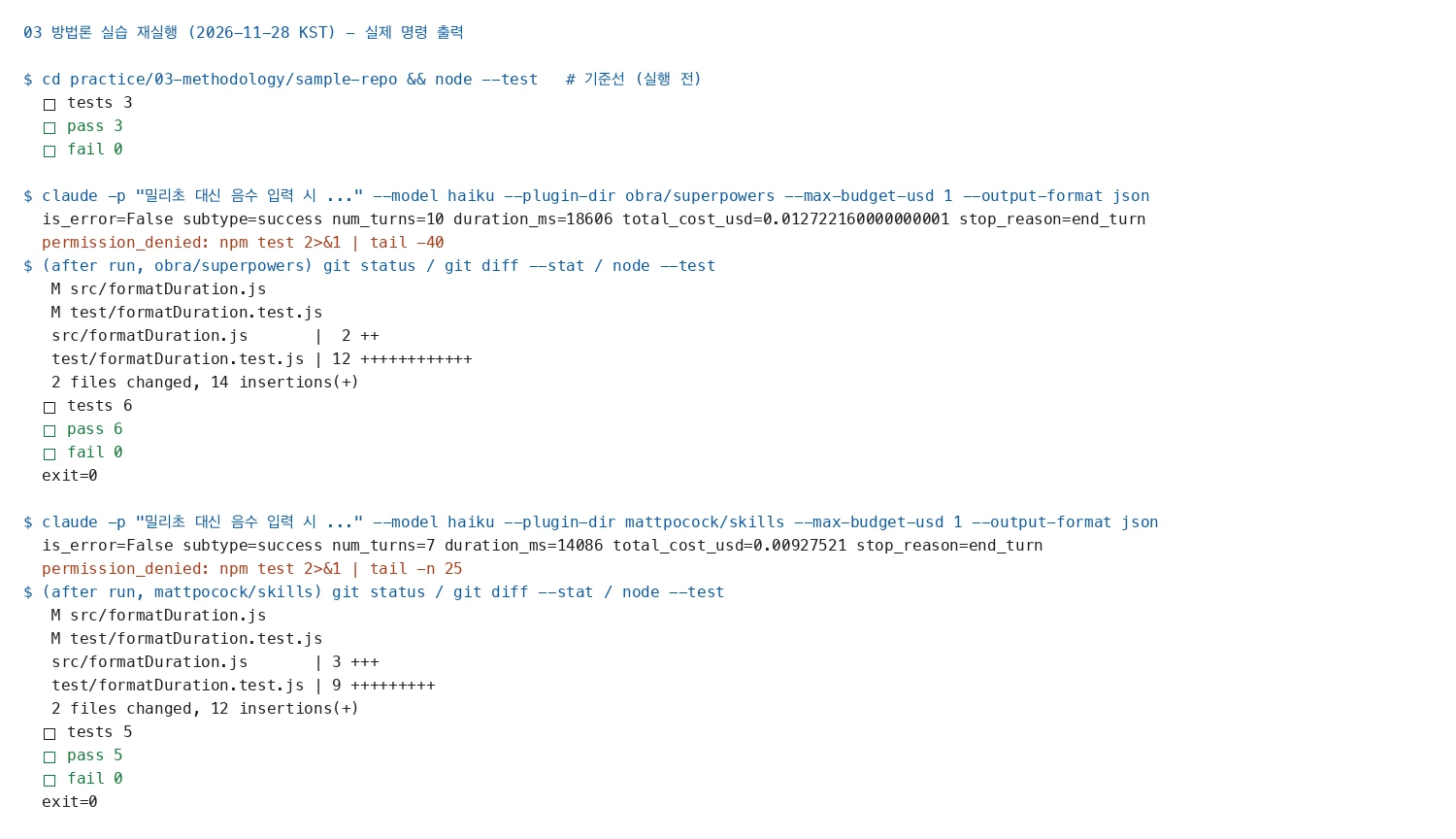
The task was: "Extend the function so that it returns an error for negative input and '0 seconds' for 0 input, instead of milliseconds, and add tests."
The sample repository is a formatDuration function and 3 tests that I wrote myself. I set 0 input to return '0ms' at first, so the 0 case would be the thing the task changes.
Each condition was run in a session-only way by passing the path of the cloned repository to claude -p with --plugin-dir. I did not do a global install.
I limited allowed commands to node, git diff, git status, and git log. Both conditions tried npm test, which was rejected as outside the allow list, so the agent ran the same tests with node --test.
Condition
Turns
Time
Cost (USD)
src lines
test lines
Tests
obra/superpowers
10
18.6 s
0.012722
2
12
6 of 6 passed
mattpocock/skills
7
14.1 s
0.009275
3
9
5 of 5 passed
Line counts are added lines from git diff --stat. The baseline had 3 tests, and the added tests were 3 for Superpowers and 2 for mattpocock.
Actual command output from the Part 3 practice rerun. Text shows the turn count, cost, git diff --stat, and node --test results for the Superpowers and mattpocock conditions.
The result JSON has no record of plugin loading or skill invocations. So I could not confirm whether each repository's skills were actually loaded and used. This practice alone does not let us say that the skills worked and produced this procedure.
Superpowers' final response said it ran the new tests first and confirmed they failed before implementation. That is the agent's self-report, and I did not verify it with an execution record.
Both runs finished without human approval, and neither committed. After the runs, git log showed only the baseline commit.
Two observations stand out. Turn count, time, and cost were lower for the mattpocock condition. Changed lines (14 vs. 12) and added test count (3 vs. 2) were higher for the Superpowers condition. But this could be the variance of one run per condition, so I do not use it as evidence that either is better.
Superpowers is a methodology that hands the order of design, planning, implementation, and review to the agent, while mattpocock/skills is a toolkit where the user picks question sessions and small skills.
Superpowers fits when you want to hand over the entire sequence, and mattpocock/skills fits when you want to keep control and use only the skills you need.
Here is how the two split by fit.
Superpowers
Fits when you want to hand over the whole flow from planning through subagent review, and can accept that even small changes get steps attached.
mattpocock/skills
Fits when you already have a development approach and want to take only the parts you need, such as question sessions, TDD, and the glossary, and adapt them.
Since the practice was one run per condition, I did not treat the differences in time and cost as a ranking. The practice figures are in the subsection above.
Installation commands and flows are based on the READMEs, so please check each repository's latest README once more before actually applying them.
 Superpowers and mattpocock/skills Compared as Agent Development Methodologies