When you attach an AI coding tool to a new project, config files pile up in several places. Before long, you lose track of which hook intercepts which command.
An all-in-one harness promises to solve this in one go.
It installs skills, commands, hooks, rules, and memory as a single bundle, which is convenient, but it is hard to tell what the install actually changes.
This installment covers
the install surface of both harnesses: the paths the install command writes to and the defaults that are on from the start, as checked first.
The targets are ECC (ecc-universal 2.2.3) and gstack (1.104.1.0).
👍
The install and hands-on usage for this installment were
not performed
. For ECC, we only ran the dry-run of setup and install in an isolated home folder, without actually installing or calling any commands. For gstack, we did not run the install script ./setup; we only read the source and docs.
The install surface refers to the paths an install command actually touches and the items it registers.
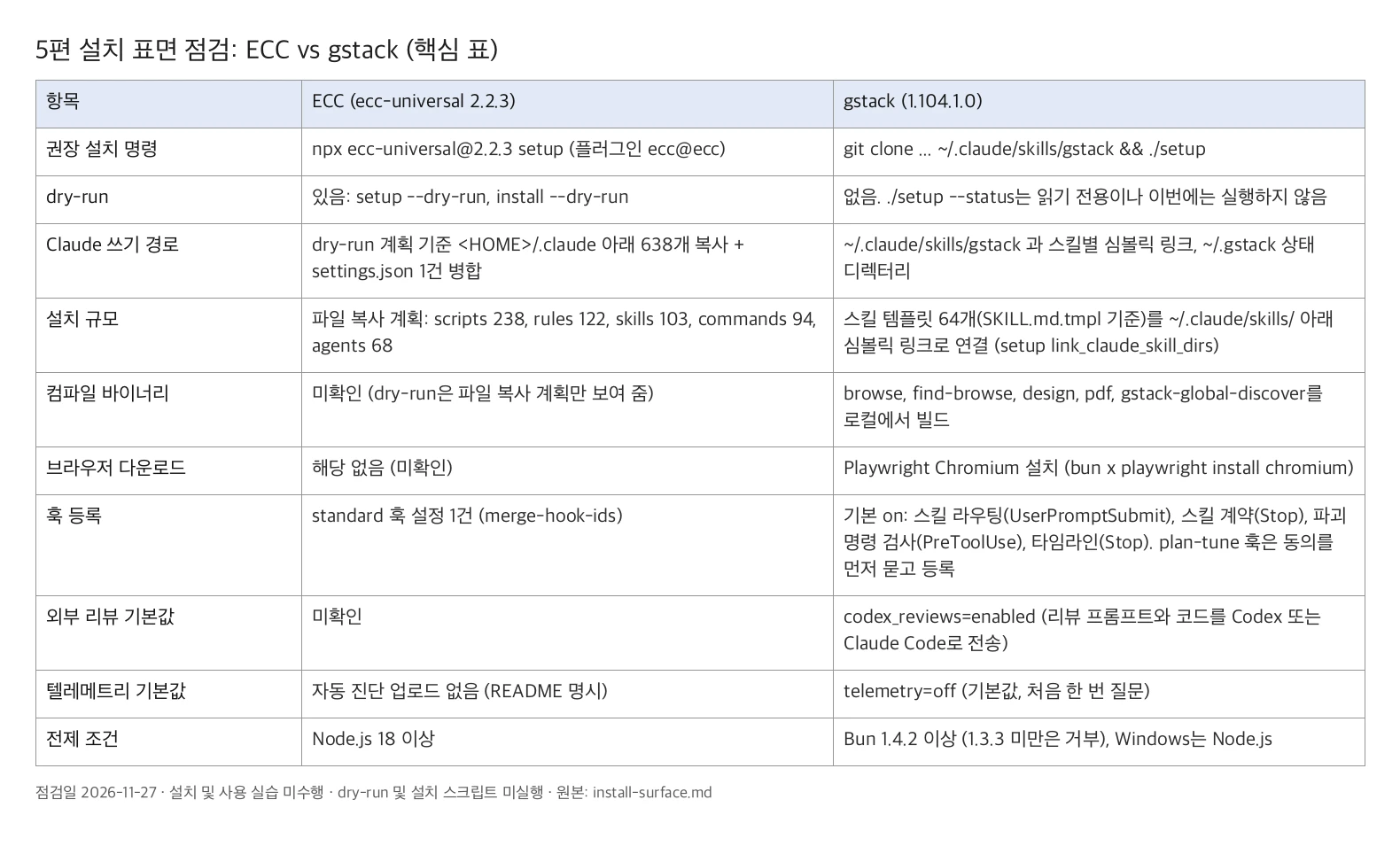
The capture below is the core table summarizing our practice log.
Table comparing the ECC and gstack install commands, write paths, hook registration, and external review and telemetry defaults
ECC is a bundle of agents, skills, commands, hooks, rules, memory, and AgentShield, a security scanner.
The README recommends npx ecc-universal@2.2.3 setup as the install command.
This time, instead of installing, we set a fake isolated folder as HOME and ran only the dry-run.
HOME=<실험 폴더>/fake-home CLAUDE_CONFIG_DIR=<실험 폴더>/fake-home/.claude npx -y ecc-universal@2.2.3 setup --mode claude-plugin --scope user --hooks standard --dry-run --json --yes
At first it failed with a CLAUDE_NOT_FOUND error.
This means setup stops when Claude Code is not on PATH.
After we linked Claude Code CLI 2.1.331 to PATH and reran the same command, we got this result.
The plan for install --profile core --target claude --dry-run --json had
639
tasks.
Of these, 638 were file copies and 1 was a settings.json merge.
The target folder was .claude under the fake home.
The plan also showed a
warning that you must explicitly choose the hook setting
.
You have to pick either --enable-hooks or --no-hooks before the plan can be applied.
After the dry-run, no files appeared outside the fake home, and the real ~/.claude was not changed.
Hooks are code that runs.
From the dry-run output we confirmed one registration for the standard hook setting, but we did not verify the contents of the hook scripts to be registered or whether the compiled binaries exist.
So it is safest to read the hook scripts yourself before installing.
gstack splits roles such as CEO, engineering manager, designer, and QA lead into slash commands.
The README install command clones the repository into ~/.claude/skills/gstack and then runs ./setup. It requires Bun 1.4.2 or later.
In this check we read the 5,254-line setup script, the README, docs/install.md, docs/privacy.md, and bin/gstack-config.
We did not run setup, so the list below is a list of planned writes compiled from reading the script.
Skill path: a symbolic link to ~/.claude/skills/gstack pointing to 64 skill templates
State folder: ~/.gstack
Local builds: the browse, find-browse, design, pdf, and gstack-global-discover binaries
Browser: installing Playwright Chromium (bun x playwright install chromium)
Hooks: the skill routing, skill contract, destructive command check, and timeline hooks are registered by default. The plan-tune hook asks for consent before it is registered.
If bun or Node.js is missing, the script stops without installing them itself.
👨💻
Before installing, you can check the state with ./setup --status. It is a read-only option, so it suits checking only the install state. In this check we did not run this command either.
The point that needs the most attention in this installment is the default that sends data outside.
We checked gstack's default settings in bin/gstack-config.
Telemetry: the default for telemetry is off, and it asks once on first run.
Update check: update_check is true, so it sends requests to GitHub two to three times.
External review: the default for codex_reviews is enabled.
👍
When codex_reviews is on, review prompts and
code
are sent to Codex or Claude Code. If you handle private code, check this value right after installing, and turn it off if needed.
The command to turn it off is gstack-config set codex_reviews disabled.
docs/privacy.md explains that the record of data actually sent can be viewed with gstack-egress list.
ECC states in its README that it does not upload automatic diagnostic information.
We did not verify ECC's external review default or its update method in this check.
According to the benchmark the maker published (the claim rests on the maker's disclosure), across 100 everyday GitHub bug and feature requests, Claude Opus 5.5 resolved 58 with gstack installed.
Among the 99 tasks scored without gstack, it resolved 61.
The README uses these results to state that gstack did not raise the resolution rate.
Looking only at the counts, the difference is -3.6 points.
However, the difference the results document computes by pairing the same tasks is
-4.0 points, 95% CI -11.0 to +2.2
.
Because the interval includes 0, this experiment should be read as showing no clear difference.
Both the original results document and the correction document are in the gstack-evals repository↗. The correction is dated November 20, 2026.
The correction fixes a point in the experiment setup: one added sentence was appended to the end of the task text, not to CLAUDE.md.
The correction document states that the totals, the interval, and the conclusion do not change.
However, these results are materials published by the maker, and there is no independent replication.
In this check we only confirmed that the documents exist and what they say. We did not rerun the experiment.
The ECC README says "1,282 tests, 98% coverage."
The same README also says that switching Opus to Sonnet can
cut costs by about 60%
.
We found where both statements appear, in the README and docs/token-optimization.md, but we did not find a measurement report or measurement method.
The only coverage threshold we found in the repository was 80% (package.json:568).
So both figures are
the maker's claims, and we could not find measurement evidence for them
Both harnesses have many items to check before installing.
ECC's dry-run plan showed 638 file copies and one settings merge, and it required an explicit choice about whether to install hooks.
gstack registers a local build, a browser install, and four hooks by default, and external review is on by default.
Before installing, check the write paths and defaults first.
This installment does not draw a conclusion about effectiveness.
The gstack benchmark is material published by the maker with no independent replication, and for ECC's figures we could not find measurement evidence.
Because we did no hands-on use of either repository after installing, you will need to check for yourself in a later step which one fits your work.
If you want to see the install scope file by file and choose hooks in detail, start with ECC's dry-run.
Use the task count and hook warning in the dry-run output as your guide.
If you need role-based slash commands and can manage the external review settings yourself, gstack is worth a look.
Decide the codex_reviews value before installing.
 All-in-One Agent Harness: ECC vs gstack