Comparing Four Design Skills for Avoiding AI Slop | PromleeBlog
When you hand a landing page to Claude Code or Codex, the results tend to look alike.
A purple gradient hero, three rounded cards, and decorative emoji always land in the same places.
Developers call this kind of screen
AI slop
.
A design skill is a bundle of SKILL.md files made to reduce this problem.
This post compares four representative design skills that aim to avoid AI slop, UI/UX Pro Max, Taste Skill, Impeccable, and Hallmark, on the same criteria.
The repositories from Emil Kowalski and Jakub Krehel, design engineers who turned their own know-how into skills, are outside the scope of this post. They are covered separately in Part 7, "Design Engineer Skills from Emil Kowalski and Jakub Krehel."
However, I did not run all four skills in the same way. I actually ran the following three:
The search.py search script of UI/UX Pro Max
I chose the search terms myself, and I did not run the install commands.
The detect command of Impeccable 4.11.1
I ran it on a single fixture file.
sloplint.mjs, the static check of Hallmark
I did not run the browser render check.
🖐️
The hands-on work in this post used a sample project I built. The target is a fictional SaaS landing page, "FlowDesk" (fixtures/landing.html). It is a sample written for teaching and is not a real product. The numbers below are results for this one sample page.
The most common way to fix an AI-made screen is to ask again with a request like "Make it more polished."
But that request has no standard, so the result changes every time.
Design skills try to fill this gap in two ways:
guidance
and
checks
.
Guidance gives the agent grounds for choosing palettes, fonts, and layouts.
Checks compare the finished screen against a set of standards. All four projects in this post rely on this kind of check.
The checks discussed here are
deterministic checks
. Applying the same rules to the same file always produces the same result.
Because the rules are written as code, the model does not change the result based on its judgment on a given day.
On the other hand, rules do not know design intent.
Even a brand that deliberately chose a white background can be flagged for using #fff. In the hands-on work, the pure white #fff body background was flagged as FAIL. This means false positives can happen.
UI/UX Pro Max: Building a Design System with CSV Data and Search 🔗
UI/UX Pro Max is a Python search engine built on a set of CSV data files.
As of November 27, 2026, the repository had 154,663 stars on GitHub.
According to the README, it includes 80 styles, 194 each of product types, color palettes, and reasoning rules, 74 font pairs, 25 chart types, 22 stacks, and 141 UX guidelines.
Search runs through a script in the repository. The command I used in the hands-on work is as follows.
-I is isolated mode. I added it so the script runs without pulling in modules from the current directory.
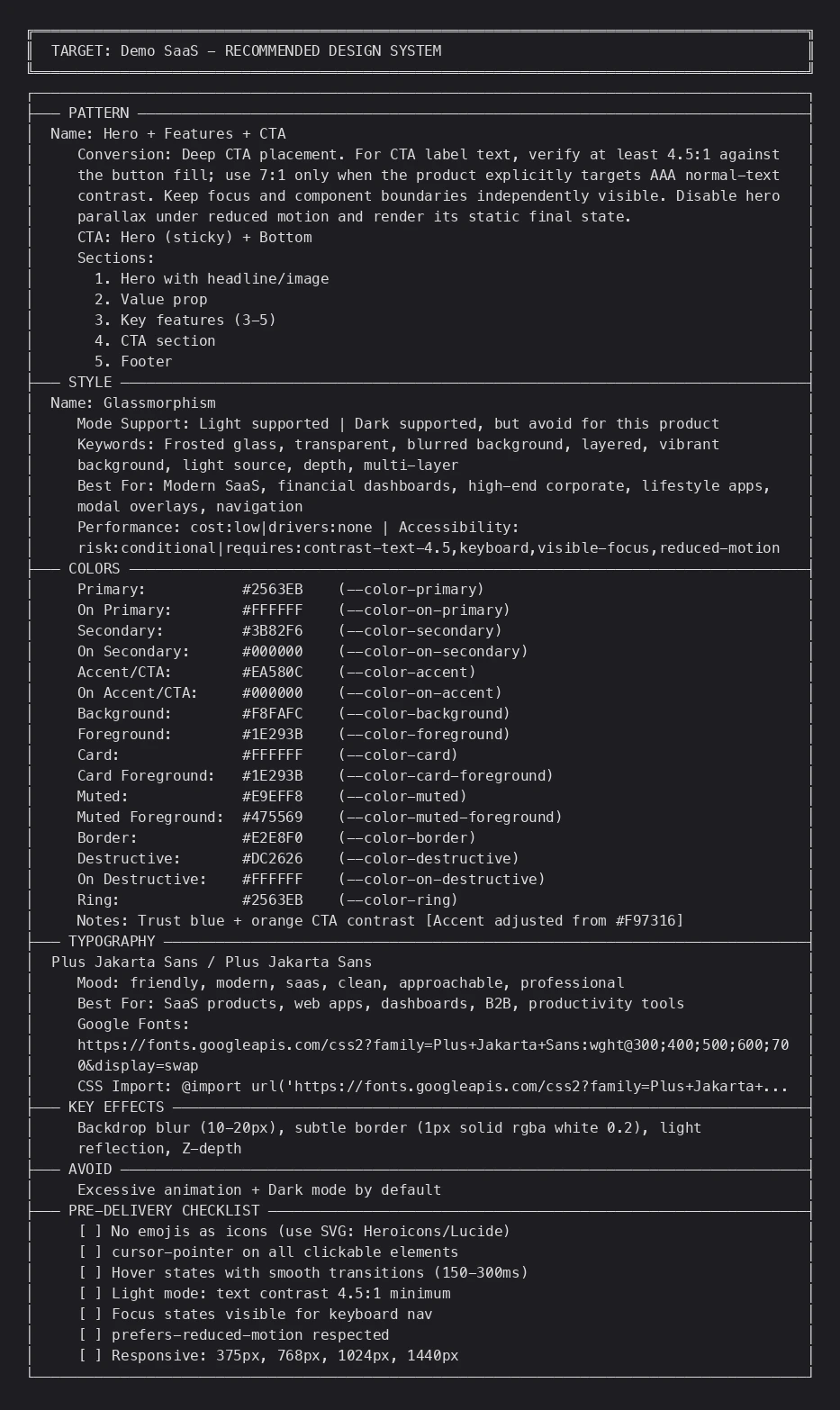
The command finished with exit code 0, and the output was 66 lines. The result contained the following items:
Pattern: Hero + Features + CTA, with five sections (hero, value proposition, three to five key features, CTA, footer)
Style: Glassmorphism
Colors: primary #2563EB, background #F8FAFC, body text #1E293B
Font: Plus Jakarta Sans
Checklist: body text contrast of 4.5:1 or higher, visible keyboard focus, and respect for prefers-reduced-motion
Output of the UI/UX Pro Max search script. Pattern, style, colors, font, and checklist are printed in that order
The README states that there are no network calls. I checked this in two ways.
First, I searched search.py, core.py, and design_system.py for urlopen, requests, and socket calls, and found none.
Then I wrapped the code to block socket connections and DNS lookups, and ran it again. The exit code was 0, and the output was byte-for-byte identical to the original.
However, this wrapper works only at the Python socket level. I did not observe subprocesses or OS-level traffic, so the confirmed scope is limited to this execution path.
The README describes two installation methods. One adds the plugin with /plugin marketplace add nextlevelbuilder/ui-ux-pro-max-skill. The other runs npm install -g ui-ux-pro-max-cli and then uipro init --ai claude. Python 3 is required. I did not run either installation command in the hands-on work.
The README also notes that the results are only guidance and that the tool does not fix the app automatically.
Search results are a starting point for design, and they do not fix the code for you.
Taste Skill and Hallmark: Random Combinations and a Check Gate 🔗
Taste Skill (design-taste-frontend 2.5.1) had 122,003 stars on GitHub as of November 27, 2026.
According to the README, a script randomly picks the palette, fonts, hero layout (11 verified types), photos, icons, and motion.
It checks screens at 1440, 1024, 820, 768, and 390 pixel widths in headless Chrome, and it has an exit gate that blocks completion while fixable FAILs remain. The README says this gate repeats up to three times.
There are no Taste check results in this post. This Mac had none of Chrome, Edge, or Chromium, and the check script consistency.mjs requires headless Chrome. So
I could not test Taste.
Everything about Taste below is based on the README.
Hallmark had 61,672 stars on GitHub as of November 27, 2026. It takes a different approach.
According to the README, it presents three themes chosen from 50, lints the rendered page, and then has a reviewer in a new context examine it.
It also says it never lets pass a minimum standard it calls the "Floor," which covers contrast, focus visibility, reduced motion, no invented facts, and mobile layout. It says photos are drawn from 755 images on Wikimedia Commons.
The hands-on work ran the static check. The browser check (--render) requires puppeteer-core and Chrome, so I did not run it.
The static check result is as follows:
sloplint: 21 FAIL, 2 REFLEX, 5 WARN across 1 file(s).
Representative findings are as follows:
FAIL 7a: The body, .hero, .btn, and .plan use pure white #fff
FAIL 26a: There is no :focus-visible style
FAIL 48: Many color literals appear outside the tokens (for example, #667eea and #ff6b6b)
REFLEX 26b: There is no :active state
WARN 40: The contrast of .btn is 2.78:1
WARN F21: An h3 follows an h1
👍
The Hallmark repository includes install.mjs and install-hook.mjs. The install hook changes user settings, so I did not run it in the hands-on work. It is safer to read the script first and confirm which files it changes before installing.
The Impeccable Detector and the Scope of Hands-On Work for the Four Skills 🔗
Impeccable (117,566 stars as of November 27, 2026 on GitHub) is a tool that teaches agents design vocabulary.
According to the README, it has 24 commands in total, combining steering commands (bolder, quieter, distill, and others), review commands (critique, audit), finishing commands, and planning commands.
Among them, detect is a deterministic detector that works without an LLM. According to the README, it has 62 rules and does not require an API key.
In the hands-on work, I installed impeccable 4.11.1 with npm and ran detect on the fixture.
The command returned exit code 2, which means findings were reported. There were six findings.
low-contrast, 3 findings: white text on #667eea at line 45 has a contrast of 3.7:1, white text on #ff6b6b at line 46 has 2.8:1, and #999999 text on a white background at line 85 has 2.8:1
overused-font: the body font is Arial
skipped-heading: an h3 follows an h1
ai-color-palette: a purple-family accent color
Impeccable detect output. It shows three contrast violations, a font issue, a skipped heading level, and a purple-family accent color
Hallmark's static check also flagged the h3-after-h1 issue separately. The two tools independently pointed out the same problem.
The purple-family accent color finding may be wrong if the brand color is purple to begin with. Telling real problems apart from false positives is up to a person.
👍
Impeccable may include a hook that runs after installation. The point to watch is that this hook can run even when the model refuses the command. The apply feature can run the codex or claude CLI with approvals and sandboxing turned off, using the options --dangerously-bypass-approvals-and-sandbox or bypassPermissions. This is summarized from the README. I did not install the hook in this work, so I did not confirm how the hook actually behaves.
Telemetry also needs checking. In the hands-on log, impeccable telemetry status returned on. You can turn it off with impeccable telemetry off, DO_NOT_TRACK=1, or IMPECCABLE_NO_TELEMETRY=1. I did not verify whether any external transmission actually happened while detect ran.
The table below summarizes the scope of hands-on work for the four skills.
Skill
Hands-on work
Result
Not tested
UI/UX Pro Max
Ran the search.py search and checked for network calls
Exit code 0, 66 lines of output
Install commands, actual screen generation
Taste Skill
Not run
None
All check scripts (no Chrome)
Hallmark
Static check sloplint.mjs
21 FAIL, 2 REFLEX, 5 WARN
Browser render check, installation
Impeccable
Ran detect
6 findings
Steering and review commands, hooks
I did not run an experiment that generated the same landing page with each of the four skills for comparison.
So I did not measure visual differences in the generated screens, accessibility pass rates, time taken, or how many times a person intervened.
This hands-on work cannot determine which of the four skills is better.
The table shows only the scope of the checks I ran, not a ranking.
The four design skills fall into two directions.
UI/UX Pro Max proposes a design system through data search, and Taste Skill picks results through random combinations and render checks.
Hallmark keeps a minimum bar with static linting and reviewer review, and Impeccable finds problems with a design vocabulary and a deterministic detector.
The lightest runs in my hands-on work were Impeccable detect and the Hallmark static check. Both read repository files, and neither changes the screen.
Even so, detection results still need human judgment. Rules do not know intent, so the first thing to do for each flagged item is to check whether there is a brand intent behind it.
I could not verify the browser checks of Taste Skill and Hallmark in this post.
To see the actual rendering results, you need to run them separately in an environment with Chrome.
 Comparing Four Design Skills for Avoiding AI Slop