Comparing the caveman and ponytail Token-Diet Skills | PromleeBlog
Token usage varies a lot between sessions even when you give the agent the same task.
Long answers increase output tokens, and reading an entire long log or test output increases input tokens.
When code grows longer than it needs to be, there is also more to review.
Token-diet skills are SKILL.md collections built to reduce these three parts.
The two representative ones are caveman and ponytail.
caveman reduces how much is said and read, and ponytail reduces how much code gets written.
The two skills target different things.
However, this post has no measurements of my own.
I could not run the measurements because the Claude CLI was not signed in.
So every figure in the body comes from the creator's published values and should be read with their sources in mind.
caveman: a skill that reduces speaking and reading tokens 🔗
caveman is a skill built on the idea that "fewer words means fewer tokens."
The tagline in the README is "why many token when few do trick".
It makes the agent say only the essentials in short form, and it also shrinks the output that tools read in.
The README describes four main features.
Speech compression: choose an intensity among /caveman, /ultracave, and /megacave. Code, commands, and error messages stay as they are.
It does not rewrite prompts. When explaining security warnings or irreversible actions, it uses complete sentences.
Read less: logs, JSON, CSV, and test output are shrunk before they go into the model. The originals stay on disk.
Auto: picks the model and effort for each request. You must sign in with a free account to use it.
Blocks: saves a script the agent wrote so it can be run again. The README introduces this as a newly added feature.
Inside an agent, you use commands such as /caveman-commit, /caveman-review, and /caveman-stats.
/caveman-compress <file> shrinks memory files such as CLAUDE.md and keeps a backup of the original.
According to the README, the install command is a single line: npx @caveman-ai/cli@latest.
It requires Node.js 22.13 or later.
To use it only as a Claude Code plugin, enter /plugin marketplace add JuliusBrussee/caveman and then /plugin install caveman@caveman, in that order.
I did not run these commands in the hands-on practice. What is written here follows the README.
The README also has a curl installer.
The installer runs a downloaded script on my computer, so read the contents once before you run it.
👍
caveman CLI telemetry is
on by default.
According to the README, it sends the commands you run, token counts, a random install ID, the OS, and your IP.
It states that prompts, code, and file paths are not sent.
To turn it off, run caveman telemetry off or set DO_NOT_TRACK=1.
Turning on Auto changes the scope of what is sent.
Only if you sign in and choose Auto, the latest question, the question right before it, and the end of the agent's answer are sent to Caveman Cloud with each request.
Attached files such as CLAUDE.md may be sent along too.
To turn this off, run caveman off routing.
ponytail: a skill that writes only the code you need 🔗
ponytail is a prompt that works from a single SKILL.md file.
Before writing code, it climbs a ladder one rung at a time.
It asks in order: is this feature really needed, does the codebase already have it, can the standard library or platform features do it, can installed dependencies do it, and can it be done in one line.
It stops at the first rung that solves the problem.
The last rung is the minimal implementation.
The ladder works only after the problem is understood.
In other words, it reads the code that will change and traces the actual flow before it picks a rung.
The README states the goal as "using only what the task needs," not "minimizing tokens."
It does not cut validation, error handling, security, or accessibility.
For logic that involves branching, loops, parsers, money, or security, it leaves one small test.
At the end of an answer, it writes down what was skipped and what was not verified.
The main commands are as follows.
/ponytail [lite | full | ultra | off]: sets the intensity or turns it off.
/ponytail-review: checks the current diff for bugs, security, load, and missing tests.
/ponytail-audit: checks the whole repository in order of importance.
/ponytail-debt, /ponytail-gain: collects deferred shortcut: comments into a ledger and shows the benchmark figures.
According to the README, installing in Claude Code takes two lines.
A shortcut: comment is a marker that records in the code a decision to "fix this later."
Running /ponytail-debt now and then keeps those decisions in the ledger so they are not forgotten.
👍
The README says to install ponytail only from the DietrichGebert/ponytail repository or from npm as @dietrichgebert/ponytail.
It says that copies containing executable files (.exe, .dll) are not distributed by the original repository, so check the install source first.
From Claude Code 2.1.290 onward, a band appears above the input box.
The band shows the task cost, agent time, code reuse ratio, and whether tests passed after the last change.
According to the README, records are kept by default in ~/.config/ponytail/band/.
All figures in this section come from the creator's README or from sources the creator cites.
According to benchmarks the creator published (source-dependent), these values are not independently reproduced results.
As of November 27, 2026 on GitHub, star counts are 123,097 for caveman and 199,397 for ponytail.
The "Say less" experiment in the README sent 10 development questions (n=10) to claude-opus-5-5.
The output tokens in the table are as follows.
Instruction condition
Output tokens
No instruction
6,983
Answer concisely.
4,334
/caveman
4,119
/ultracave
2,693
According to the creator, on a median basis /caveman cut 3% more than Answer concisely., and /ultracave cut 35% more.
These figures are based on the caveman 3.1.0 skill text.
The creator's HONEST-NUMBERS document says they have not re-measured since the rules changed in 3.2.0.
The README also notes that the rules themselves use about 1,160 input tokens.
The "Read less" experiment ran 18 pairs across 6 tasks with synthetic, large tool outputs.
Across sessions run three times, the total input tokens fell from 885,793 to 591,673, a 33.2% reduction.
18 of 18 answers were correct.
HTML does not have a compressor yet, so session tokens rose 9.9%.
This measurement was run with the August 2026 engine.
The Terminal-Bench 4 comparison at the top of the README also needs a closer look.
This result is not about the caveman skill. It compares the Caveman Code app build that the README newly introduces with Claude Code.
On Opus 5.5, 97 of 180 and 83 of 177 tasks were solved, and the cost per solved task was $5.19 and $6.04.
The 95% confidence interval is 0.70 to 1.02 times.
The creator reads this as no difference, but states that they measured a build with the benchmark settings turned on, not the app as shipped.
There are also third-party citations. Here is the scope I checked against the original sources.
The abstract of the CAVEWOMAN paper (arXiv 2606.24083) says output compression lowered the actual cost per model by 1.4 to 2.4 times on most API models. The README presents this paper as an Adobe Research paper.
An Elasticsearch Labs post announced that response tokens fell 63.6% compared with the default conversation mode across eight of its own MCP scenarios.
The README cites a JetBrains A/B announcement. It reports that output tokens fell 8.5% and that no quality loss was measured.
I could not open the JetBrains original, so read this as (original source unverified).
The README also links to the HONEST-NUMBERS document, which lists the cases where caveman loses out.
According to the README, the Ponytail 5 benchmark compares Claude Code with and without the skill.
39 tasks (including real FastAPI and React repositories), each run 5 times, on Opus 5.5.
Compared with no skill: code volume -53%, time -41%, cost -26%, tokens -45%.
Share of risky logic with tests attached: 98%, higher than 68% without the skill.
Share of planted bugs the agent's tests caught: 66%, versus 46% without the skill.
The README's figure descriptions give 100% and 87% for planted issues found in review, but I could not find those in the benchmark result files.
The methodology is also worth noting.
According to the result files, there are 585 sessions in total, across three conditions: no skill, v4.13, and v5.
Because Bash was blocked in every condition, this measured coding ability and did not measure debugging ability.
The author ran these directly.
It is interesting that the test ratio rose even though the code was halved.
Still, this is also a measurement from the creator's side.
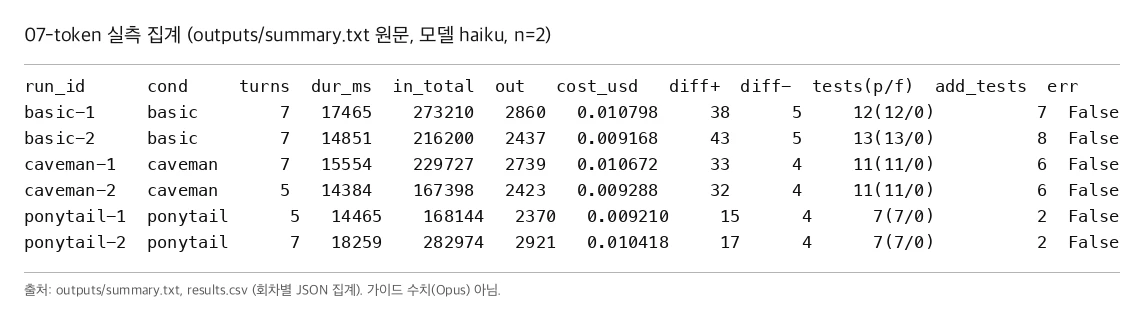
The practice the guide set was to run the same three tasks under the baseline, caveman, and ponytail conditions, and measure session tokens and diff line counts.
On November 28, 2026, on local macOS, I used Haiku as the model and ran each condition twice.
There is one task: add an error for negative input and 's' (seconds) unit support to parseDuration, and add tests.
The average total input tokens across the three conditions are below. Total input tokens is the sum of input, cache creation, and cache read tokens.
Condition
Average total input tokens
vs. baseline
Baseline
244,705
Reference
caveman
198,563
-18.9%
ponytail
225,559
-7.8%
Run-to-run variation is large, so I do not draw conclusions from these values.
The baseline ranged from 216,200 to 273,210, caveman from 167,398 to 229,727, and ponytail from 168,144 to 282,974.
Use the average differences only as a directional reference.
The cost was about $0.01 per run (based on total_cost_usd in the JSON).
Added test blocks were 7 to 8 in the baseline, 6 for caveman, and 2 for ponytail.
A smaller diff line count does not mean the requirements were met better, and I did not do a code review.
07 token-savings measurement summary table showing turns, time, total input tokens, output tokens, cost, diff line count, and passing test count per run
This result comes from one model (Haiku), one task, and two runs.
The creator's benchmarks above use Opus 5.5 and differ in model, task, and sample, so I do not compare them directly with this result.
Whether the plugin hooks ran was not confirmed.
The state file the plugin left in the home directory during the experiment was cleaned up right after the experiment.
caveman reduces speaking and reading tokens, and ponytail reduces the amount of code.
If the cost is concentrated in long answers and long log output, look at caveman first. If you have more code to review than you need, look at ponytail first.
caveman suits developers whose output runs long and whose tool output often piles up.
Check the telemetry settings before installing, and when you use Auto, check what gets sent.
ponytail suits teams that want to cut code volume and review burden.
For logic that must be tested, it helps to set a separate team standard.
This post did not test whether the two skills can be used together.
 Comparing the caveman and ponytail Token-Diet Skills