Agents That Remember: Comparing claude-mem and planning-with-files | PromleeBlog
When you hand a long task to an agent, its context breaks at some point.
Typical cases are when you clear the conversation with /clear, when the conversation grows long and compaction (summary compression) kicks in, or when the terminal closes and you open a new session.
The agent forgets which files it just changed and what is still left.
So it sometimes redoes research it already finished, or runs steps that were already done.
The representative tools for this problem are
claude-mem and planning-with-files
.
Both leave records outside the session, but their methods differ.
claude-mem has a separate agent observe the work activity and store it in a database. The next session pulls those records back out.
planning-with-files keeps the plan and progress in three markdown files inside the project. A hook injects that content again on every turn.
This post summarizes the structure of both tools and what to check before installing, based on their READMEs and repository docs.
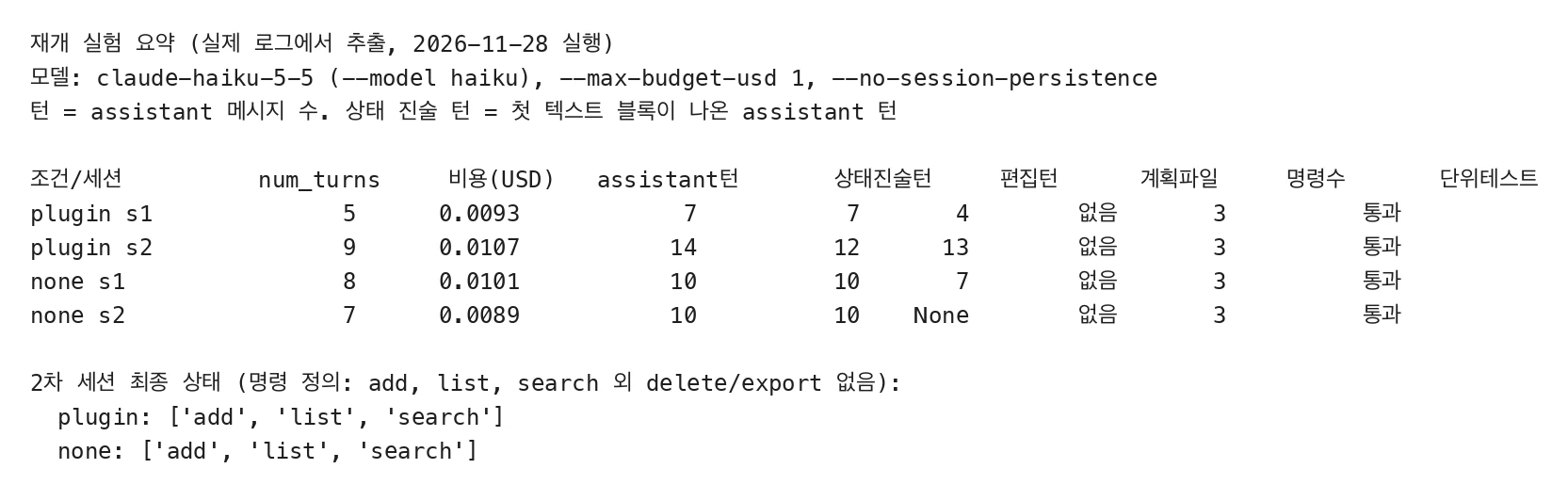
The resume experiment ran on Haiku, but no plan file was ever created, so it did not lead to a conclusion. The results and the reasons are explained in the last section.
The planning-with-files README explains this problem with an analogy to computer architecture.
The context window is volatile like RAM and has limited capacity.
The file system is persistent like a disk.
So the README's starting point is that
important content must be written to disk
.
The README names /clear, compaction, and crashes as events that clear the context window.
It says the pattern follows the approach that Manus described first.
Memory tools and planning tools solve slightly different problems.
The README's FAQ describes memory tools such as vector stores or knowledge graphs as tools for recalling past facts.
planning-with-files, by contrast, says it focuses on carrying forward the steps and state of the work in progress.
It treats the two approaches as complementary.
claude-mem: store observation records in SQLite and inject them into the next session 🔗
Once claude-mem is installed, the agent's tool calls (read, edit, run) pass through hooks to a local worker.
A second agent that the worker calls, the
observer
, turns that activity into short observation records.
When a session ends, the observer also writes a summary.
The records are stored in a SQLite database (claude-mem.db) inside the ~/.claude-mem folder. The README says the memory stays on your computer.
When the next session starts, an index of observation records related to the project goes into the agent.
According to the README, memory injection starts from the project's
second session
.
If you want the whole repository read from the beginning, you can use the /learn-codebase command. The README says it takes about 5 minutes on a typical repository.
Search happens in three steps.
You get a result list with search. You look at the surrounding context with timeline.
Finally, you fetch details only for the items you picked, using get_observations.
The README says one index entry is about 50 to 100 tokens and one detail entry is about 500 to 1,000 tokens.
However, the README states that this difference is
According to the README, the install commands are short.
In Claude Code, you register the marketplace, install the plugin, and then restart the session.
The README separately notes that npm install -g claude-mem installs only the SDK and does not register the hooks.
There are three things to check during installation.
First,
anonymous usage analytics (telemetry) is on by default.
To turn it off, run npx claude-mem telemetry disable. Cloud sync is opt-in.
Second, the installer asks you to log in with an email
magic link
in the browser. The README says the login does not require a card.
Third, if you pick
claude-mem observer
as the observer, a
30-day free trial
starts. During this process, a payment page opens where you enter a payment method.
When the trial ends, memory moves back to Anthropic's pricing plans unless you subscribe, the README explains.
Other options include using your own OpenRouter or Gemini key as the observer, or using an Anthropic plan.
The README says you can skip the login with the --provider option or the CLAUDE_MEM_ONLINE_OPTIN=false setting.
The README also has an entry about a token (CMEM) created by a third party. The installation steps I checked this time had no step to buy that token.
planning-with-files: three plan files and per-turn injection 🔗
planning-with-files creates three files in the project: task_plan.md, findings.md, and progress.md.
task_plan.md holds the steps and checkboxes. It serves as the resume point after /clear.
The README explains that these files record execution state such as step status, research findings, errors, and progress.
The hooks do two things.
When each turn starts, the UserPromptSubmit hook re-injects the selected part of the active plan.
After /clear or a new session, the skill re-reads the project files from disk.
The README says one run of the hook takes about 289ms.
The commands include /plan (/pwf), /status, /plan-doctor, /plan-attest, and /plan-goal.
/plan-attest locks task_plan.md with SHA-256. The README explains that if the content changes, the hook stops injecting it.
/plan-goal keeps execution going together with Claude Code's /goal until the plan is marked complete.
👨💻
The README says plan files are gitignored by default and are not archived automatically.
When you start the next task, the root plan file is overwritten, so if you want to keep a plan's results, it is safer to copy it elsewhere when the task is done.
If you install through the skill path, the hooks can quietly go missing.
The README gives examples: project trust is not set, or in a project-level install the frontmatter hooks are not registered.
If the hooks matter to you, the README recommends installing through the plugin path and checking with /plan-doctor.
This plugin's hooks call shell scripts and Python scripts.
Before installing, it is a good idea to read the hook settings and the script bodies yourself.
In this post I checked only the README and did not read the script bodies.
benchmarks published by the creator, and the figures depend on that source
. I did not reproduce them in this post.
The first is the assertion pass rate with and without the skill.
According to the creator's published benchmark, the group that used the skill passed 29 of 30 assertions (96.7%). The group that did not use it passed 2 (6.7%).
The evaluation framework is Anthropic's skill-creator. The README says it was run on skill v2.21.0 and model claude-sonnet-4-6 on March 6, 2026.
This figure measures whether the agent follows the file structure.
The README states that it does not measure whether goals drift during long autonomous work. New models and autonomous mode are not included in this figure.
The second is the number of turns it took to resume after the context was cleared.
The README says that with a plan file the average was 5.0 turns, and without one it was 13.3 turns.
However, this measurement comes from the creator's internal v1 (July 6, 2026, based on v3.4.0).
The README says the current file-based recovery method was not measured the same way. It is also not an independent comparison.
Comparing the two approaches and the state of the experiment 🔗
As of November 27, 2026, the GitHub star counts are 120,012 for claude-mem and 28,250 for planning-with-files.
Star counts only indicate popularity. The table below carries over the structure described in the READMEs.
Item
claude-mem
planning-with-files
Recording method
An observer agent records activity automatically
Plan files updated during work, injected every turn by hooks
Storage location
SQLite inside ~/.claude-mem
Three markdown files inside the project
Cost and latency
Observer model calls (free trial, paid, or your own key)
Hook latency (about 289ms per run, per the README)
How to check
Web viewer (/viewer)
Open the files directly
Watch out for
Login, a trial that requires a payment method, analytics on by default
An install path that drops the hooks, no automatic archiving
Which approach fits depends on how you work.
If you often look up past conversation content, claude-mem's search structure seems like a good fit.
If you often finish long tasks step by step, planning-with-files' file structure seems like a good fit.
This judgment comes from comparing the structures written in the READMEs, not from measurements.
The MEMORY.md in this blog's working environment is also structured as an index that points to individual memo files.
In that it is a file people read, it is closer to planning-with-files.
In that it is automatic memory, it resembles claude-mem.
The resume experiment ran two conditions with Haiku (claude-haiku-5-5), each in a first and a second session.
The plan-file condition loaded planning-with-files as a plugin, and the comparison condition did not load it.
The first session was stopped after implementing only step 1 (the search command). The second session received only one line: "Continue from here."
The turn count is a proxy metric counted by assistant messages, and the cost is the USD value recorded by the CLI.
Condition/session
Turns
Cost (USD)
Plan file
Plugin loaded, 1st
5
0.0093
None
Plugin loaded, 2nd
9
0.0107
None
No plugin, 1st
8
0.0101
None
No plugin, 2nd
7
0.0089
None
Summary table of the resume experiment. It lists the turn count and cost for four sessions, shows no plan file in any of them, and includes a column for whether unit tests passed
👍
The resume experiment was run, but it did not reach a conclusion.
None of the four sessions created a plan file, and in the second session neither condition implemented step 2.
So the conclusion that "the plan file helped the resume" cannot be drawn.
The session logs had no skill invocation records, and the hook records showed only SessionStart. I did not confirm why no plan file was created. The plugin hooks may not have run, and the limits of headless mode are also possible causes, but I could not confirm either one.
claude-mem was not run, because it requires starting a worker process and going through login.
This experiment needs to be redesigned. You must first confirm the conditions under which plan files are actually created before the resume effect can be compared.
claude-mem and planning-with-files tackle the same problem at different layers.
claude-mem observes activity automatically and accumulates it. The next session pulls those records back out.
Before installing, check the telemetry default, the magic link login, and the trial that requires a payment method.
planning-with-files keeps the plan and progress in files. Hooks inject that content again on every turn.
Install paths can drop the hooks, so it is worth checking with /plan-doctor.
The structural comparison of the two tools is based on the READMEs. The resume experiment was run, but no plan file was created, so it did not reach a conclusion.
To measure the resume effect, the experiment conditions must be redesigned so that plan files are actually created.
 Agents That Remember: Comparing claude-mem and planning-with-files