 Anthropic Official Document Skills and Cloudflare Security Audit Skill
📅
skills/), a skeleton for creating new skills (template/), and the Agent Skills specification (spec/).
The four document skills, docx, pdf, pptx, and xlsx, are introduced as the same skills that power Claude's document features.
However, the README adds that even the same skill may behave differently in Claude. This means the repository code does not by itself guarantee how the product behaves.
The install commands follow the README. In this test I did not install from the marketplace. Instead, I pointed --plugin-dir at the cloned repository./plugin marketplace add anthropics/skills
/plugin install document-skills@anthropic-agent-skillsscripts/ that the agent can run. It is safer to read these scripts before installing.e4bb5d9), 18 of the 19 skill folders contained a LICENSE.txt with the full text of Apache License 2.0. doc-coauthoring did not have one.
name and description, and the body below them holds the instructions Claude follows.Not logged in · Please run /login because I was not logged in yet, so no file was created. After logging in, I ran it again with the same goal. The results below are from that second run.
I loaded the xlsx skill from anthropics/skills as a wrapper plugin, ran it once with the Haiku model, and confirmed that the file was created.
The wrapper structure differs from the original repository. The original lists four document skills in one plugin through a marketplace definition file, and it has no plugin.json at the root. So I made a wrapper plugin (xlsx-only, including plugin.json) that copies only the xlsx folder and pointed --plugin-dir at it. I left the original repository unchanged.
The run options were --model haiku, --max-budget-usd 1, and --permission-mode acceptEdits. The result was is_error: false, num_turns: 7, and a cost of 0.01176 USD.
I could not confirm a Skill tool call in the result JSON. So I do not conclude that the skill was invoked to create the file. The file could also have been created with the Bash or Write tool.
The generated outputs/visits.xlsx has a sheet named 방문기록 (visit log) covering range A1:G6. The header has seven columns: No., visit date, visiting company, visitor, purpose of visit, responsible department, and notes. There are 5 data rows. Visiting companies are Example Company A through E, visit dates run from 2026-11-02 to 2026-11-27, and every notes cell reads 샘플 데이터 (sample data). There are 0 formula cells, and the font is Arial.
The data is a sample made by the model. I did not give it real visit records in the prompt, so this is not a summary of actual records.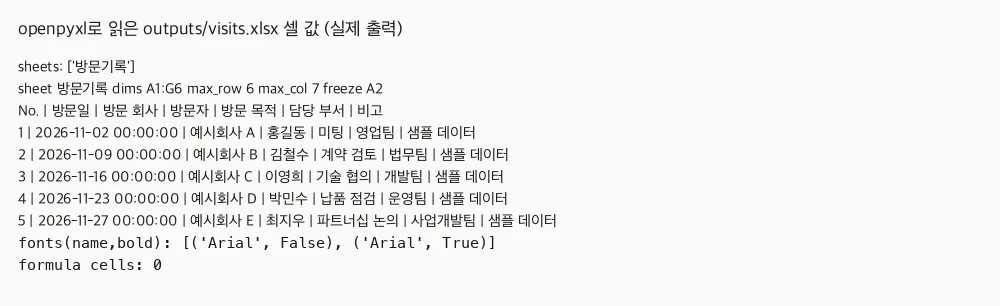
openpyxl, pandas, and markitdown are preinstalled, but in this environment import openpyxl failed with ModuleNotFoundError under the system python3. So I ran the script and checked the cells in a venv in the experiment folder.scripts/recalc.py). The SKILL.md rules below are summarized from reading the original repository text..xlsx, .xlsm, .csv, and .tsv.
The rule in SKILL.md to watch is about formulas.
It says not to compute results in Python and insert them, but to write them as formulas such as =SUM(B2:B9).
A file saved by openpyxl has no calculated values, so it must be recalculated with scripts/recalc.py. Until then, the document says pandas reads formula cells as None.npx skills add https://github.com/cloudflare/security-audit-skill --skill security-audit. This command runs through the npx skills CLI based on skills.sh. In this test I did not run the install command.
Security questions and local checks run in guide mode and do not create files. If you ask for a full audit, such as "Security audit this codebase", full audit mode turns on and runs all six stages.architecture.md and coverage-ledger.json.confirmed, needs_validation, and rejected and writes them to findings.json.REPORT.md from the verified records.validate-findings.cjs and validate-coverage-ledger.cjs, check findings.json and the ledger against their schemas.
In the repository, these two validator pairs were the only executables. I did not find an install script or hook within the scope I read. However, this only covers the files I read, so it is worth looking once more before installing.
The three verdicts mean different things.
confirmed is applied only when source tracing is complete and the observed result is bounded.needs_validation records one unresolved fact, so it has no severity.
So needs_validation does not mean "no problem." It is an item whose judgment is deferred, and in stage 6 these items are collected separately in NEEDS-VALIDATION.md.scratch/, and resource limits.
The model must also support tool use and parallel subagents.
needs_validation.~/security-audit-skill/<repo-name>/run-<N>. To write inside the repository, the user must choose that folder directly, and version control must ignore the entire folder.
SKILL.md also says not to use /tmp or the home directory as an alternative write path. If you actually run it, setting an experiment folder as the output path rather than the default path makes results easier to find and clean up.
A full audit counts agent calls, and if the user sets a budget, it runs only within that budget. SKILL.md requires that if the budget runs out before candidates are validated, the report is not marked complete, and the run status is recorded as incomplete.needs_validation.
Second, I ran a harness that checks the candidates in a Docker container started with --network none. The container had a read-only root file system and the target folder mounted read-only. The harness records only the SQL strings passed to db.query, with no real database.== C-01 name 문자열 연결 (user-search.js) ==
정상 입력 alice -> returned
SQL: SELECT id, name, email FROM users WHERE name = 'alice'
주입 형태 입력 -> returned
SQL: SELECT id, name, email FROM users WHERE name = 'x' OR '1'='1'
== C-02 role 문자열 연결 (user-search.js) ==
role 주입 형태 입력 -> returned
SQL: SELECT id, name, email FROM users WHERE name = 'alice' AND role = 'admin' OR '1'='1'
== C-03 orderId 템플릿 리터럴 (user-search.js) ==
숫자 입력 42 -> returned
SQL: SELECT * FROM orders WHERE id = 42
주입 형태 입력 -> returned
SQL: SELECT * FROM orders WHERE id = 1 OR 1=1
== 대조: 입력 검증 버전 (signup-validate.js) ==
같은 name 주입 형태 -> threw: invalid name
같은 role 주입 형태 -> threw: invalid roleOR condition, and C-03 placed OR 1=1 in the numeric slot. The validated counterpart rejected the same input.
However, this experiment shows only that the query string changes. I did not check whether a real database would return other users' data, or whether an upstream caller filters the input. So these candidates should be read as "candidates whose query structure change was confirmed," not as "confirmed vulnerabilities."
The Docker container is a minimal setup that covers only the network block and write restriction among the sandbox requirements. I did not enforce resource limits or an environment-variable allowlist in this run.