Imagine you are building a new chat feature and deciding between WebSocket, HTTP polling, or a UDP-based protocol.
Whichever you pick, you ultimately have to decide
which process on the remote host your process talks to, and with what quality
.
In the previous series, we covered the Internet's five-layer architecture.
Starting with this series, we look at the topmost layer, the
application layer
.
This post walks through application architectures, how processes communicate, and the services applications require from the transport layer.
A network application consists of programs running on different hosts that exchange messages over the network.
Application developers do not write code that runs on routers or switches.
The code runs
only on hosts at the network edge
, and devices in the core do not interpret application-layer message contents.
This lets you deploy new services quickly without changing network equipment.
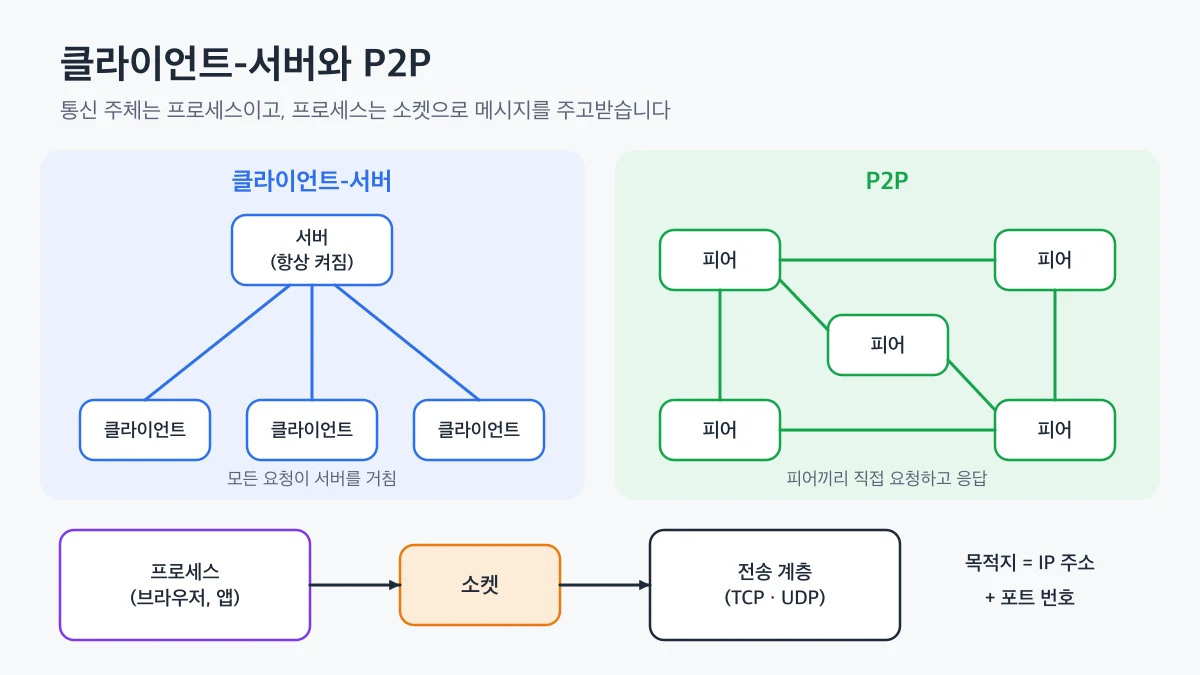
handles requests from many clients.
The server has a fixed IP address and domain, so clients can reach it at any time.
Clients do not communicate with each other directly; every request goes through the server.
The web, email, and most mobile app APIs use this architecture.
A single server cannot handle a growing user base, so real services spread requests across many servers in data centers with load balancers.
communicate directly without relying on an always-on server.
Each peer requests services from other peers while also providing services itself.
The advantage of P2P is
self-scalability
.
As peers join, requests increase, but so does the number of hosts providing the service.
On the other hand, peer IP addresses change often and connections can drop at any time, which makes management and security harder.
BitTorrent for file sharing and WebRTC media transport for video calls are typical examples.
Aspect
Client-server
P2P
Service provider
Always-on server
All participating peers
Addressing
Server has a fixed address
Peer addresses change often
Scaling
Add servers and data centers
More peers means more capacity
Examples
Web, email, REST APIs
BitTorrent, WebRTC media
In the client-server architecture every request goes through the server, while in P2P peers connect directly; in both cases processes exchange messages with the transport layer through sockets
A process sends and receives messages over the network through a
socket
.
A socket is the interface between the application layer and the transport layer, provided by the operating system as an API.
You can think of a socket as
the door of a house
.
The process just pushes messages out the door, and the transport layer and the layers below carry them to the door of the other house.
So what a developer can control is mostly
Sending a message to a specific process requires two pieces of information.
IP address
Identifies the destination host.
Port number
Identifies the destination process within the host, or more precisely, that process's socket.
Web servers usually use port 80 (HTTP) or 443 (HTTPS), and mail servers use port 25 (SMTP).
Running a development server on port 3000 or 8080 and opening it in the browser with the port number follows the same principle.
How port numbers distinguish multiple processes on one host is covered in detail in multiplexing in the Transport Layer series.
Each application expects a different level of quality from the transport layer.
Requirements fall into four broad categories.
Reliable data transfer
Needed by applications that cannot lose a single byte, such as file transfer, payments, and email. Real-time audio and video, on the other hand, tolerate some loss.
Throughput
There are
bandwidth-sensitive
applications such as video streaming that need a minimum rate, and
elastic
applications such as email that adapt to whatever throughput is available.
Timing
For video conferencing and online games, the experience degrades sharply once delay exceeds a few hundred ms.
Security
Confidentiality and integrity of data and authentication of the other party.
UDP is a lightweight protocol that sends messages immediately without connection setup.
It does not guarantee delivery or ordering and performs no congestion control.
That is why real-time services that are delay-sensitive and can tolerate some loss, or protocols that implement their own reliability, use UDP.
QUIC, used by HTTP/3, also implements reliability and congestion control itself on top of UDP.
Neither TCP nor UDP
guarantees throughput or delay
.
Internet telephony and video conferencing work well not because of guarantees, but because the applications are designed to cope with delay and loss.
TCP itself does not encrypt data.
Applications that need security therefore layer
TLS
(Transport Layer Security) on top of TCP to provide encryption, integrity checks, and server authentication.
TLS runs at the application layer as a library, and HTTPS is simply HTTP over TLS.
Application
Application-layer protocol
Transport protocol
Web
HTTP/1.1, HTTP/2
TCP (+TLS)
Web (modern)
HTTP/3
UDP-based QUIC
Email
SMTP
TCP
Remote access
SSH
TCP
Domain lookup
DNS
Mostly UDP
👨💻
When choosing a transport for a new feature, first check
whether data loss is acceptable
.
If loss is not acceptable, use a TCP-based protocol; if latency matters more, consider UDP or protocols that run over UDP, such as WebRTC or QUIC.
Let's try TCP socket communication directly with Node.js's net module.
The server process waits for connections on port 5050 and returns received messages in uppercase.
When you run it, the server prints the client's IP address and
the port number the operating system picked automatically
, and the client receives HELLO SOCKET.
The developer chose the server's port 5050, but the operating system assigns the client port from the ephemeral port range.
On macOS, use the following command to see which server processes are waiting for connections and on which ports.
lsof -nP -iTCP -sTCP:LISTEN
The COMMAND column shows the process name, and the NAME column shows the address and port the socket is bound to.
On Linux, ss -ltnp shows the same information, and on Windows, netstat -ano does.
👍
If you get an "address already in use" error, first use the command above to find the process holding the port.
Before killing it, check its name and PID to make sure it is not another service you need.
 Principles of Network Applications