You receive a report that an image-heavy product detail page loads unusually slowly.
The server's response time is fast at around 50 ms, yet the whole page takes several seconds to appear.
This gap comes from the fact that the browser
requests dozens of objects individually, not just one HTML file
, and from how HTTP connections work.
In the previous post, we covered the principles of the application layer.
This post looks at how
HTTP
(HyperText Transfer Protocol), the web's application-layer protocol, sets up connections and exchanges messages, how cookies remember state, and how web caches speed up responses.
HTTP is the application-layer protocol that defines the format and order of request and response messages exchanged between web clients and web servers.
A web page consists of multiple
objects
.
There is a base HTML file, which references objects such as images, CSS, and JavaScript files by URL.
After receiving the HTML, the browser requests each referenced object separately.
HTTP uses
TCP
as its transport protocol.
Once the client sets up a TCP connection with the server, both sides exchange messages through sockets, and TCP takes care of message loss and ordering.
HTTP is also a
stateless
protocol: the server does not remember previous requests.
If the same client requests the same object twice, the server responds as if it were the first request.
opens and closes a new TCP connection for every object exchanged.
The time to receive one object is as follows.
1 RTT to set up the TCP connection
1 RTT to send the HTTP request and receive the first byte of the response
The time to transmit the file
RTT
(Round-Trip Time) is the time it takes for a small packet to travel from the client to the server and back.
So with non-persistent connections, each object takes
keeps a TCP connection open and reuses it for multiple requests and responses.
It has been the default since HTTP/1.1, and the server closes the connection after a period with no requests.
If requests are sent back to back without waiting for responses, multiple objects can arrive in roughly 1 RTT.
Condition
Value
RTT
50 ms
Number of objects
1 HTML + 10 images
File transmission time
Ignored
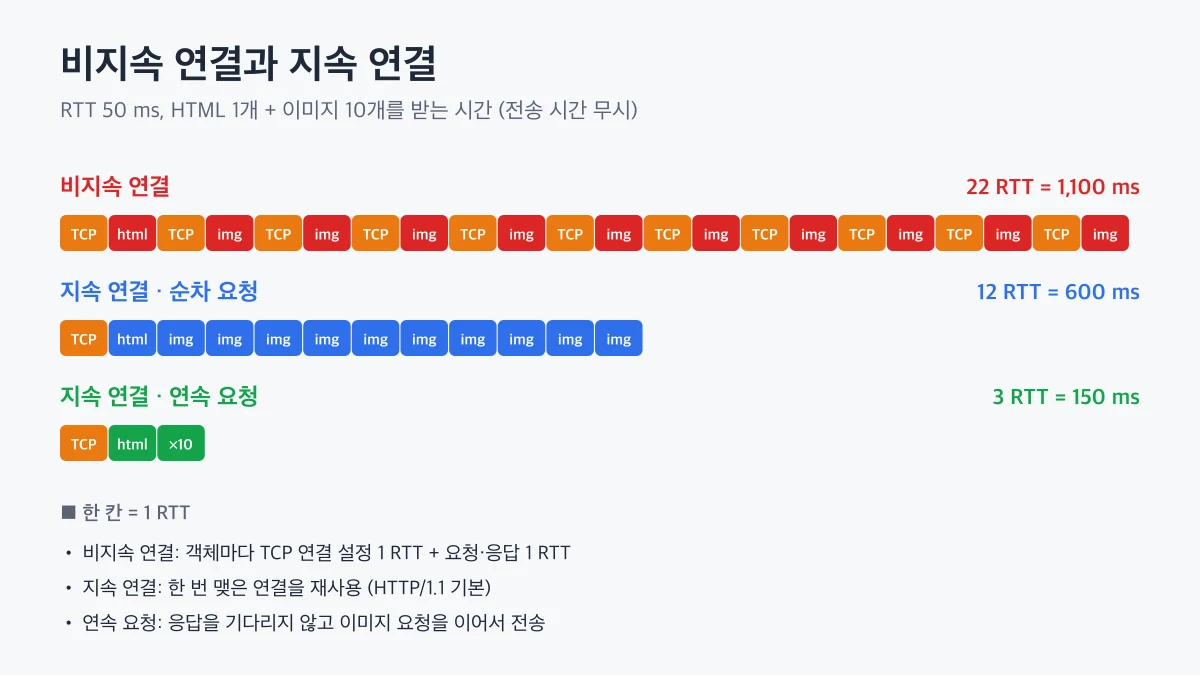
Non-persistent, sequential requests
11 × 2 RTT = 1,100 ms
Persistent, sequential requests
1 RTT + 11 × 1 RTT = 600 ms
Persistent, back-to-back image requests
1 RTT + 1 RTT + 1 RTT = 150 ms
For the same page, the response time differs by more than 7x depending on the connection method.
That is why browsers use persistent connections and open several parallel connections to the server to reduce latency.
Comparison showing that non-persistent connections spend 2 RTT per object on TCP setup and the request, while persistent connections exchange multiple objects in succession over one connection, reducing the total time
HTTP/1.1 messages are human-readable ASCII text.
Using the -v option of curl, you can see the request and response headers actually exchanged.
curl -v https://example.com/ -o /dev/null
In the output, lines starting with > are the request message.
> GET / HTTP/1.1> Host: example.com> User-Agent: curl/8.7.1> Accept: */*
Request line
Consists of the method, URL path, and HTTP version. Methods include GET for retrieval, POST for sending data, PUT for updates, DELETE for deletion, and HEAD for fetching headers only.
Header lines
The Host header lets a server that serves multiple domains from one IP address know which site is requested.
Body
Used by requests that send data, such as POST or PUT.
HTTP is stateless, but features such as login and shopping carts need to remember users.
This is where
cookies
come in.
On the first visit, the server creates an identifier and sends it in the Set-Cookie header of the response.
The browser stores this value per domain.
On every later request to the same site, the browser sends the value in the Cookie header.
The server uses this value to look up the user's session in the database.
In other words, the protocol itself stays stateless, and
state lives in the client's cookies and the server's storage
.
🖐️
Session cookies must have the HttpOnly, Secure, and SameSite attributes.
Without them, the risk grows that scripts can read the cookie or that it is sent over unencrypted connections or with requests from other sites.
, or proxy server, stores recent responses on behalf of the origin server and returns them.
When the browser sends a request to the cache, the cache responds immediately if it has the object, or fetches it from the origin server, stores it, and then responds.
Because the web cache is close to users, response times drop and traffic on the organization's external link decreases.
The principle is the same as the
cache and hit rate
concept from data structures, and today CDNs (Content Delivery Networks) play this role on a global scale.
is how a cache checks whether a cached object is still the same as the original.
The cache sends the stored object's ETag value or Last-Modified time in the request headers.
Put the ETag value from the first command into the If-None-Match header of the second command.
If the object has not changed, the server sends only 304 Not Modified without a body, and the cache uses its stored object as is.
Because the body is not downloaded again, the benefit is larger for big images and bundle files.
👨💻
For static files with hashed filenames that change on every build, set a long max-age and add immutable.
For documents whose content changes, such as HTML, set no-cache so a conditional request is sent every time, and you get
HTTP/1.1 processes requests in order on a single connection, so if a large response ahead is delayed, smaller responses behind it wait too. This is
HOL blocking
(Head-of-Line blocking).
HTTP/2
Splits messages into small frames and interleaves multiple requests and responses on one TCP connection, which is called
multiplexing
. It also provides header compression and stream prioritization.
HTTP/3
Uses
QUIC
over UDP instead of TCP. When a packet is lost, only the affected stream waits, eliminating TCP-level HOL blocking, and combining connection setup with the TLS handshake makes the first response faster.
The meaning of HTTP methods, status codes, and headers is the same regardless of version (RFC 9110 · HTTP Semantics↗).
What changed is how those semantics are carried.
running over TCP.
Persistent connections remove the cost of opening a connection per object and greatly reduce page load time, while cookies maintain user state on top of a stateless protocol.
Web caches and conditional GETs avoid fetching the same object repeatedly, improving both response speed and traffic.
If a page is slow, do not look only at server response time; check the number of requests, connection reuse, and cache hits in the Network tab of your browser's developer tools.
The next post looks at
DNS
, the process by which the browser finds the server's IP address.
 Web and HTTP