You moved your service to a new cloud and changed the domain's IP address.
Yet some users reach the new server, while others still reach the old one hours later.
This happens because
DNS
, which translates domain names into IP addresses,
caches
responses in many places.
In the previous post, we saw how the browser exchanges messages with a server over HTTP.
But before sending an HTTP request, the browser must first know the server's IP address.
This post covers the DNS hierarchy, the query process, caching, and how to look up the main record types yourself.
DNS (Domain Name System) is a distributed database that translates human-friendly hostnames into the IP addresses routers use, as well as the application-layer protocol for querying it.
DNS mainly uses UDP port 53, and uses TCP when responses are large or a zone transfer is needed.
When the browser connects to www.example.com, the operating system's DNS client first looks up the IP address, then a TCP connection is opened with the result.
Besides name translation, DNS provides the following services.
Host aliasing
Lets you use an easy-to-remember alias instead of a complex real name (the canonical name).
Mail server aliasing
Tells senders which actual mail server should receive mail addressed to a domain such as example.com.
Load distribution
Registers multiple IP addresses under one name and rotates their order in each response to spread requests across servers.
If a single DNS server managed every name in the world, one failure would stop the entire Internet and every query would converge on one place.
So DNS splits the namespace and has many servers manage it
hierarchically
.
Root DNS servers
Provide the addresses of TLD servers. Thousands of instances around the world operate via anycast under 13 root server names (IANA · Root Servers↗).
TLD DNS servers
Handle generic top-level domains such as .com and .org and country-code domains such as .kr and .jp, and provide the addresses of each domain's authoritative DNS servers.
Authoritative DNS servers
Hold the actual records for a particular domain. Organizations run their own or use DNS hosting services such as Route 53 or Cloudflare.
Outside the hierarchy sits the
local DNS server
.
At home this role is played by the ISP or the router, and at work by the company's internal DNS; it receives queries from hosts and follows the hierarchy to find answers on their behalf.
Public DNS services such as 1.1.1.1 and 8.8.8.8 can also serve as your local DNS server.
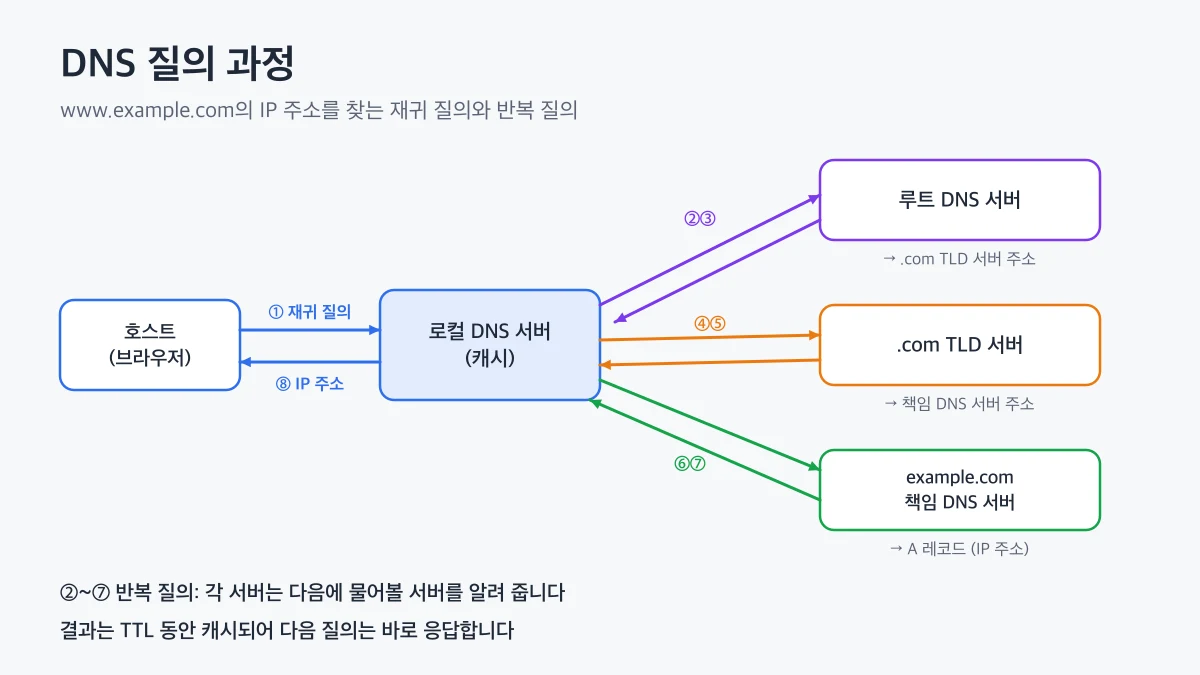
When a host queries the local DNS server, the local DNS server asks the root, TLD, and authoritative DNS servers in turn, obtains the IP address, and caches the result
A host finds the address of www.example.com as follows.
The host queries the local DNS server.
The local DNS server asks a root server, which returns the address of the .com TLD server.
The local DNS server asks the TLD server, which returns the address of the authoritative DNS server for example.com.
The local DNS server asks the authoritative DNS server, receives the IP address, and passes it to the host.
Handing off the job of
finding the final answer for you
, as in step 1, is called a
recursive query
.
Getting back only
the next server to ask
, as in steps 2–4, is an
iterative query
.
Typically, queries between the host and the local DNS server are recursive, and those between the local DNS server and other DNS servers are iterative.
This process resembles
tree traversal
in data structures.
Starting at the root, it descends one level at a time to a child node, beginning with the rightmost label of the name, until it finds the answer.
Starting from the root every time would require several round trips per query.
So DNS servers
cache
the responses they receive and answer repeated queries directly without walking the hierarchy.
Most TLD server addresses are cached in local DNS servers, so few queries actually reach the root servers.
Cached records are discarded once their
TTL
(Time To Live) expires.
As in the server migration at the start of this post, even after you change the IP address, some users keep using the old address until the old record's TTL expires.
👨💻
If you plan a server migration,
lower the record's TTL to about 300 seconds a few days in advance
.
Once the old TTL has expired from all caches, changing the IP address completes the switch within minutes, and you can raise the TTL again after the migration is stable.
.
A record consists of a name, value, type, and TTL, and the meaning of the name and value depends on the type.
Type
Name
Value
Example use
A
Hostname
IPv4 address
Web server address
AAAA
Hostname
IPv6 address
IPv6 web server address
CNAME
Alias
Canonical hostname
Point www to a CDN address
NS
Domain
Authoritative DNS server name
Delegate a domain's DNS servers
MX
Domain
Mail server name
Receive mail for a domain
TXT
Name
Arbitrary text
Domain ownership verification, SPF
For example, if you create a CNAME record for www with a CDN-provided hostname as its value, the CDN manages the actual IP addresses.
The CDN returns different A records depending on the user's location, directing them to a nearby server.
The first command prints only the answer section of the response. The number in the second column is the remaining TTL in seconds, and the fourth column is the record type.
The second and third commands briefly show only the values of the domain's mail servers and authoritative DNS servers.
If you run the same command repeatedly, you can see the TTL decrease.
That means the local DNS server is returning a cached response.
To follow the iterative query process from the root yourself, use the +trace option.
dig www.example.com +trace
In the output you can see the root servers, the .com TLD servers, and the authoritative DNS servers answer in turn.
On Windows, use nslookup; on Linux, use dig or host.
👍
dig queries DNS servers directly without going through the system resolver, so its results may differ from what the browser actually uses.
If you suspect the operating system cache on macOS, clear it with sudo dscacheutil -flushcache and check again.
that translates hostnames into IP addresses.
The local DNS server queries the root, TLD, and authoritative DNS servers in turn to find the answer, and caches the result for its TTL to answer repeated queries quickly.
Records such as A, CNAME, and MX on authoritative DNS servers determine the path to web servers, CDNs, and mail servers.
If a domain change is not taking effect, first check the TTL and the responding server with dig.
Starting with the next post, we move on to the Transport Layer series and look at the
services of the transport layer
, which handles process-to-process communication beneath the application layer.
 DNS