A coworker working from home says their video calls keep dropping.
The company servers and the meeting service are both fine, yet only that coworker has the problem.
In cases like this, the cause usually lies at the edge of the Internet, that is, in
the segment from the user's device to the first router
.
This segment is called the
network edge
.
In this article, we look in turn at the hosts connected at the edge, the
access networks
that connect hosts to an ISP, and the
physical media
through which the bits actually flow.
Finally, we cover how to check your own access environment on macOS.
In the previous article, we described devices connected at the edge of the Internet as
hosts
or end systems.
Hosts are divided by role into
clients
and
servers
.
The side that sends requests, such as a browser on a laptop, is the client, and the side that receives requests and returns web pages or API responses is the server.
The same machine can play both roles depending on the situation.
For example, an API server acts as a server for user requests but becomes a client when it calls a payment provider's API.
In other words, client and server are
Most servers for large services are concentrated in
data centers
.
A data center connects a large number of servers with high-speed switches and connects to multiple ISPs to prepare for failures.
Applications deployed to the cloud also ultimately run on hosts inside such data centers.
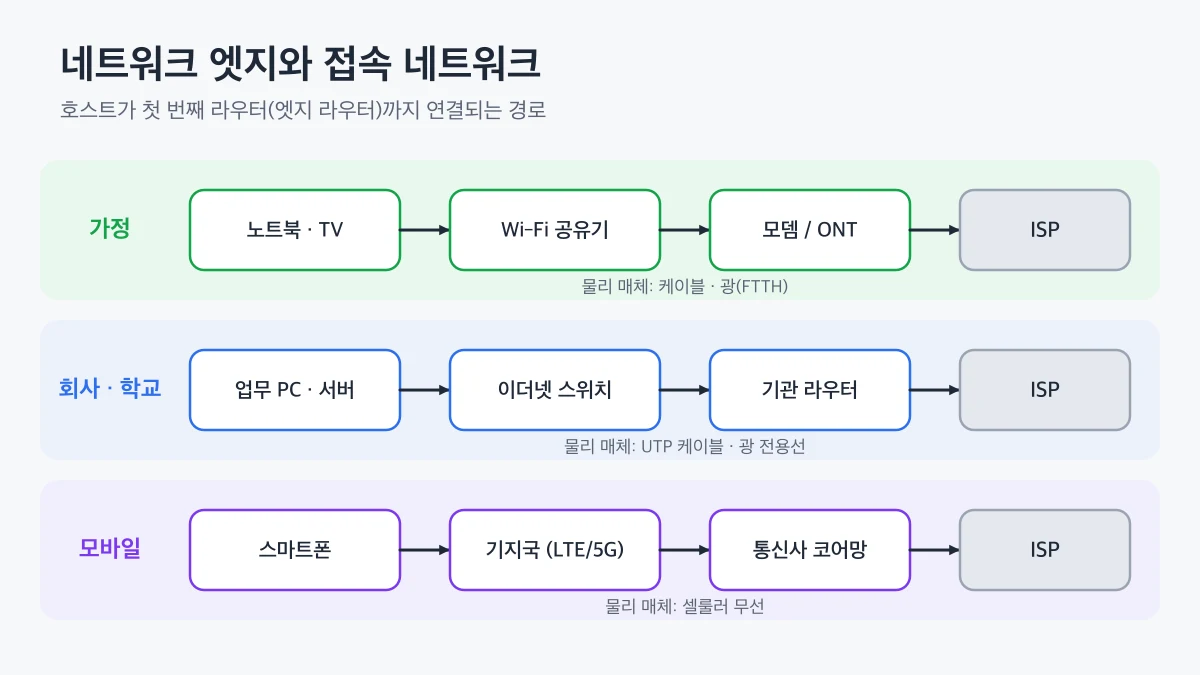
At home, laptops and TVs connect to a Wi‑Fi router, which connects to the carrier's network through a modem or an optical network terminal (ONT).
The main types of residential access are as follows.
DSL
(Digital Subscriber Line)
Transmits data over existing telephone lines. The farther you are from the telephone office, the lower the speed.
Cable Internet
Uses an HFC (Hybrid Fiber-Coax) structure that combines the coaxial cable used for cable TV with optical fiber. Subscribers in the same area
share
the line, so speeds can drop when many users are online, such as in the evening.
FTTH
(Fiber To The Home)
Connects optical fiber directly from the carrier's equipment to the home. It can reliably deliver high transmission rates and is widely used in new apartment complexes and urban areas.
👨💻
If your Internet speed is slower than your plan, first measure it
while connected to the router by cable
.
If the wired connection reaches the expected speed, the problem is more likely in your home Wi‑Fi than in the access network.
is the most widely used technology.
Each PC connects to an Ethernet switch with a UTP cable, and the switch connects to the ISP through the institution's router.
Wi‑Fi
(IEEE 802.11) access points are added for wireless access so that laptops and phones can join the same network.
Both Ethernet and Wi‑Fi are
local area networks
(LANs).
Devices on the same LAN can communicate directly through a switch or access point without going through a router.
Smartphones access the Internet through a mobile operator's
base station
.
Cellular technologies such as LTE and 5G cover a range of several kilometers, so connections can be maintained even while moving.
More recently, Fixed Wireless Access, which uses 5G as a home Internet connection, has also appeared.
Environment
Main technologies
Connecting equipment
Characteristics
Home
DSL, cable, FTTH
Modem, ONT, router
Subscriber line; whether it is shared depends on the method
(twisted pair)
A cable in which two copper wires are twisted together to reduce interference. Office Ethernet cables are a typical example.
Coaxial cable
A structure in which a center conductor is surrounded by insulation and a shielding layer. It is used for cable TV and cable Internet.
Optical fiber
Transmits bits as pulses of light. Because it has little signal attenuation and electromagnetic interference, it is used for long-haul backbones and submarine cables.
networksetup -listallhardwareports
Shows the network interfaces your Mac has, such as Wi‑Fi, Ethernet adapters, and Thunderbolt Bridge, along with their device names.
networksetup -getinfo Wi-Fi
Shows the IP address, subnet mask, and router address of the Wi‑Fi service. If you use a wired connection, run it with a different service name.
ifconfig en0
Checks the interface's MAC address (ether), IP address (inet), and connection state (status).
If the router address in the output is a private address such as 192.168.x.x, the home router is the first device in your access network.
If you see status: inactive, the interface is not connected.
On Windows, you can check the same information with ipconfig /all, and on Linux with the ip link and ip addr commands.
👍
The output of ifconfig and networksetup includes your device's MAC address and internal IP address.
When sharing the output for troubleshooting, it is safer to mask these values.
that connect them to the first router.
DSL, cable, and FTTH fill this role at home; Ethernet and Wi‑Fi at companies and schools; and LTE and 5G on the move.
And every bit travels over
physical media
such as copper, optical fiber, or radio.
If only specific users have unstable connections, suspect the edge before the server, and start by checking a wired connection and the interface status.
In the next article, we look at the
network core
, which carries packets to their destination beyond the edge, and at packet switching.
 Network Edge - Hosts, Access Networks, and Physical Media