You have probably seen a feature in another app and wondered how it was built.
If the source code is not public, you usually stop at imitating the behavior you can see from the outside.
Looking inside the executable yourself means learning disassemblers and decompilers, and that barrier is fairly high.
REA is a tool that hands this work to an AI coding agent.
The agent calls reverse engineering tools directly, and the person asks questions in natural language and verifies the results.
When I checked with the GitHub API on November 23, 2026, the repository had 475,030 stars, a sign of how much attention it drew in a short time.
This is the first post in the series.
It covers what REA is, how it differs from the traditional approach, and what it can analyze, and then introduces the order of the remaining posts.
Installation and hands-on work start in part 3 with real execution results.
👨💻
The numbers and commands in this post are as of November 23, 2026.
The latest rea-agents version I confirmed on npm that day was 6.10.1.
REA updates often, so check rea --help and the official docs again when you follow along.
one MCP for reverse engineering across binaries, applications, and runtime behavior
.
In one line, it is
an open source MCP server and CLI that connects AI coding agents to reverse engineering tools
.
The basic facts are as follows.
Item
Details
Repository
github.com/morluto/rea
Official site
rea.tools
npm package
rea-agents
CLI command
rea
License
MIT (third-party components keep their own licenses)
Where analysis runs
The user's computer (locally)
Reverse engineering is the work of analyzing a finished program without its source code to learn how it works.
MCP (Model Context Protocol) is a standard protocol AI agents use to call external tools.
Part 2 explains both concepts in more detail.
One more sentence in the README is worth noting.
It says REA
analyzes targets locally
and returns the evidence and limitations behind each conclusion.
The same README also points out that the agent receives the analysis results, and the model provider running that agent has its own data policy.
It is worth remembering that
even when analysis runs locally, the results pass through the agent to the model
The size of the attention shows first in the numbers.
These are the values I confirmed with the GitHub API↗ on November 23, 2026.
Item
Value
Stars
475,030
Forks
115,785
Repository created
2026-04-14
License
MIT
The bottom of the README also has a line celebrating
400,000 GitHub stars
.
What is interesting is that the attention arrived all at once.
According to the timeline in a pbxscience article↗, the repository was created in April and went largely unnoticed for months.
On October 6 it had fewer than 10,000 stars, it passed 100,000 around October 11 to 12, and by October 14 it had about 234,000.
The same article says eight releases shipped in the nine days from October 3 to 11.
The article's caveat deserves attention too.
Stars and forks show attention, not installations or real-world results.
Numbers measure buzz, not performance.
That is why this series looks at real execution results and limitations separately.
👍
The October star history comes from a third-party article, and I did not verify the day-by-day record myself.
The November 23 figures and the creation date come directly from the GitHub API response.
How it differs from existing reverse engineering tools 🔗
In the traditional approach, a person opens a tool like Ghidra or IDA directly.
They scan the function list, read decompiled code one function at a time, and take notes while following who calls what.
The tools are powerful, but
deciding where to look
is entirely up to the person.
With REA, the flow changes.
The person
Asks in natural language, such as "Show me how search works in this app, with evidence."
The agent
Calls REA tools over MCP to open the target, find functions, and read code and references.
REA
Runs analysis engines such as Ghidra, Hopper, IDA, and Kuna on the agent's behalf and returns results with evidence.
The person again
Reads the agent's explanation and evidence and checks whether it is right.
The example prompt in the README works the same way.
It asks the agent to show how search works in the Notes app with evidence, and then build a similar feature for your project.
The important point here is that REA
is not a newly built decompiler
.
Native decompilation is handed to an existing Hopper, Ghidra, IDA, or Kuna installation, while static JavaScript and .NET analysis runs without an engine.
According to the README's FAQ, native analysis returns pseudocode and assembly, and JavaScript/Electron analysis returns modules and their relationships.
In the end, REA's role is closer to
bundling several analysis tools in a form agents can use well, and attaching evidence to the results
.
When you actually connect it, the scale is considerable.
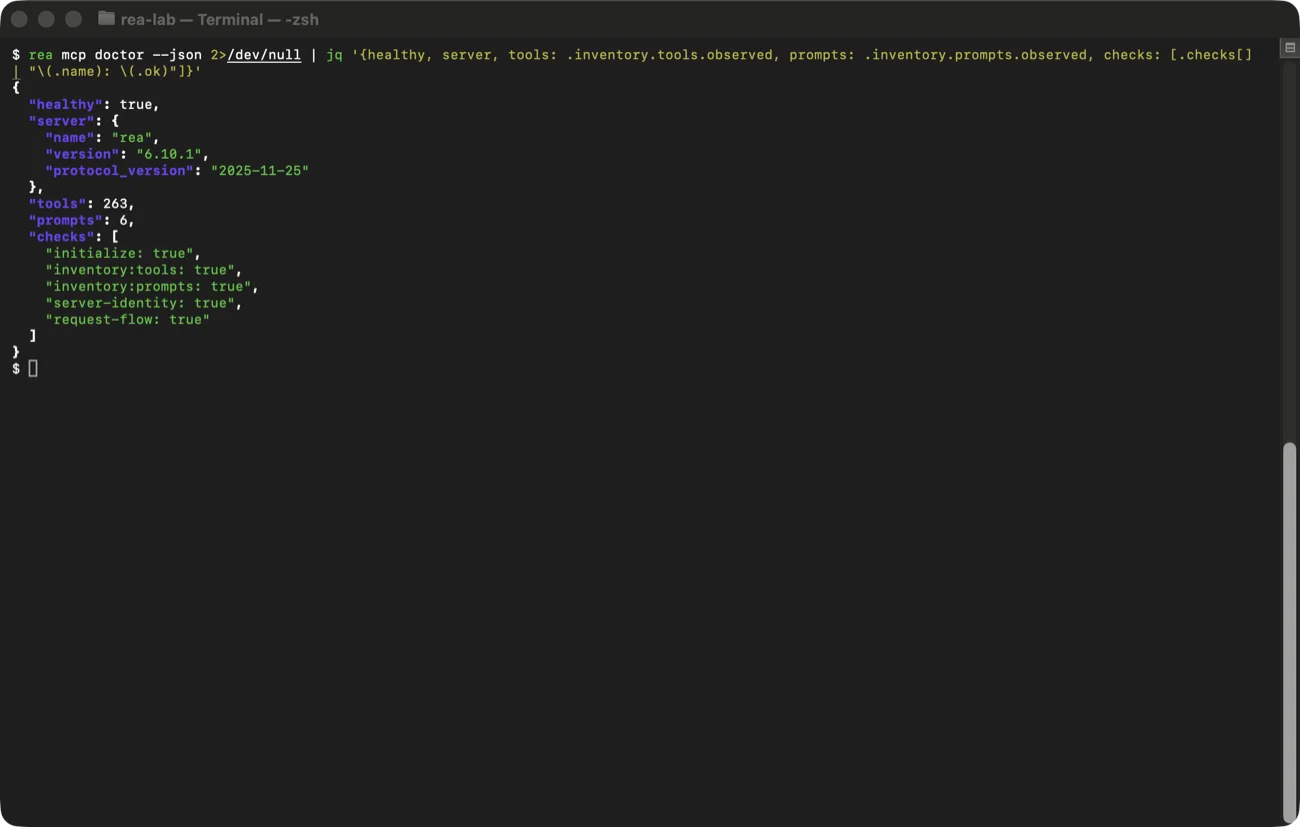
Below is the result of checking the MCP server with rea mcp doctor.
rea mcp doctor result: healthy true, server name rea, version 6.10.1, protocol_version 2025-11-25, 263 tools, 6 prompts, and the initialize, inventory, server-identity, and request-flow checks all true
The MCP server in version 6.10.1 exposed 263 tools and 6 prompts.
No one needs to memorize this list; the agent picks the tools that fit the question.
Part 3 covers how to run these checks in detail.
The README lists its targets as native binaries, JavaScript and Electron apps, websites, .NET assemblies, Android apps, firmware, and recorded runtime and network activity.
The table in the supported targets document↗ had 42 entries as of November 23, 2026.
Grouping just the representative ones gives the following.
The same document draws a clear line between static analysis and runtime capture.
Static JavaScript and .NET analysis
only reads the files and does not run the application.
Runtime capture, on the other hand, runs or interacts with the target using your user permissions.
When you handle untrusted programs, this difference is a difference in risk
, so part 9 covers it separately.
👍
Reading the name "Anything" as a guarantee that every format is supported would be a mistake.
Each target needs its own engine and operating system, and the results are at the level of pseudocode or structural information.
The original source code does not come back as it was.
Reverse engineering tools can become a problem depending on how they are used.
REA's DISCLAIMER↗ lists both the permitted uses and the uses it does not support.
Permitted uses
Security research, malware and incident analysis, vulnerability research and coordinated disclosure, CTFs and education, interoperability, software preservation, and debugging or auditing software you own or are authorized to examine
Unsupported uses
Bypassing DRM, license checks, or anti-cheat, game cheats, unauthorized bypassing of authentication and bot protection, copying proprietary software or its code and assets, evading AI provider policies, and reselling AI accounts
The same document also says that
public availability of software or possession of a file does not by itself grant permission for every operation
.
REA does not provide licenses for commercial tools such as IDA or Hopper either.
The hands-on work in this series uses only programs I wrote myself and public open source samples.
Where you get the installer matters too.
The README says to get REA only from the official repository, rea.tools, or the rea-agents package on npm.
It adds that a similar repository name or a copied README does not establish that a download is official.
🖐️
Fake releases impersonating the REA name have circulated.
Do not run archives you got from search results or shared links, and install only from the three official sources above.
REA is an MCP server and CLI that lets AI coding agents operate existing reverse engineering tools on your behalf.
Here is what this part covered.
It does not build a new decompiler engine; it connects existing engines such as Ghidra, Hopper, IDA, and Kuna, plus its own static analyzers, to the agent.
Results come with evidence and limitations, and verifying them is still the person's job.
Star counts show the size of the attention, not a guarantee of performance.
Check the official distribution sources and usage principles first, and use it only on targets you own or are authorized to analyze.
In the next part, we look at the basic reverse engineering concepts you need to understand REA, together with real decompilation results.
 What Is REA - The Reverse Engineering MCP for AI Agents